Allen-Bradley 5094-RTB32C Flex 5000 Removable Terminal Block Troubleshooting Guide (Fault Diagnosis)
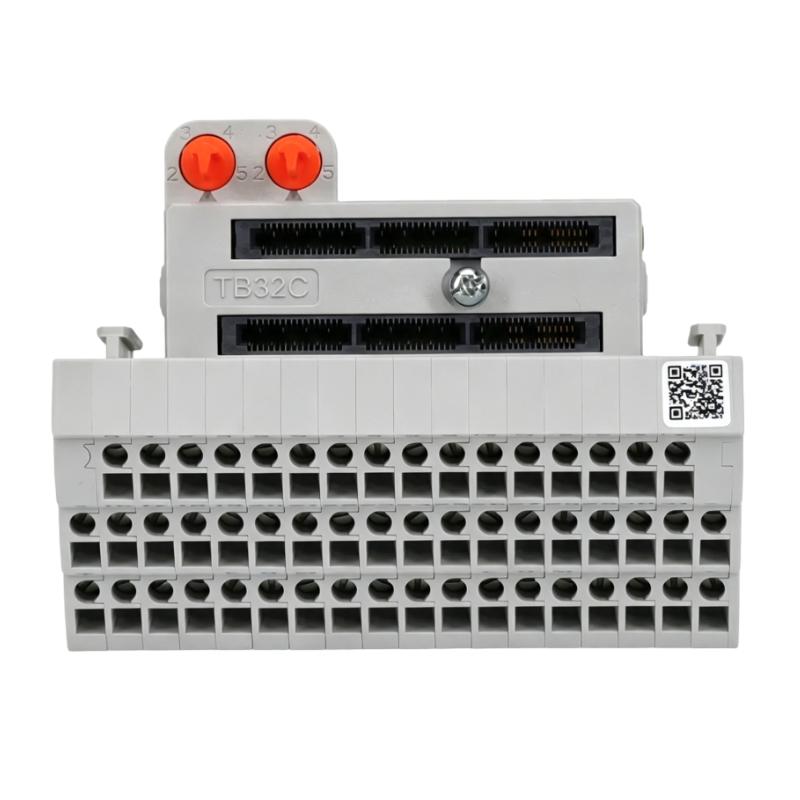
Allen-Bradley 5094-RTB32C removable terminal block faults are commonly caused by loose connections, incorrect terminal assignment, damaged field wiring, or improper installation positioning rather than failure of the terminal block itself. Effective troubleshooting requires checking the complete connection path between field devices and the Flex 5000 I/O system.
This article describes a field case where several I/O channels became intermittent after machine maintenance.
Allen-Bradley 5094-RTB32C Terminal Block Fault Symptoms
Typical fault symptoms include:
- Input signals disappear randomly
- Output devices do not respond
- I/O diagnostics show channel problems
- Machine sequence stops unexpectedly
- Signals recover after restart
Field case:
A packaging machine experienced intermittent sensor failures after a control cabinet modification.
Initial observations:
- PLC communication: Normal
- Flex 5000 adapter: Normal
- Some sensors: Intermittent
The maintenance team suspected:
- Sensor failure
- I/O module problem
- Network communication issue
Engineers began troubleshooting from the physical connection layer.
Allen-Bradley 5094-RTB32C Fault Diagnosis Process and Signal Analysis
The troubleshooting path:
Field Device
      |
      |
5094-RTB32C Terminal Block
      |
      |
Flex 5000 I/O Module
      |
      |
PLC Controller
Engineers checked:
- Field voltage
- Terminal connections
- Channel diagnostics
- Module status
Diagnostic results:
- PLC program: Normal
- Network status: Normal
- Signal interruption: Between field wiring and terminal interface
The fault location was narrowed to the terminal connection area.
Allen-Bradley 5094-RTB32C Connection Failure Investigation
Field measurements:
Before repair:
- Sensor supply voltage: Present
- Input signal: Intermittent
- Channel status: Changing randomly
Engineers inspected:
- Terminal screws
- Wire condition
- Terminal block installation
The investigation found:
- One field wire had insufficient tightening force
- Mechanical vibration caused intermittent contact
Technical impact:
The unstable connection caused:
- Signal loss
- Incorrect machine sequence
- Intermittent alarms
The 5094-RTB32C itself was operating normally.
Allen-Bradley 5094-RTB32C Root Cause Analysis and Recovery
The final root cause was poor terminal connection quality.
Original condition:
- Machine operated normally
- Signal transmission was stable
Fault condition:
- Vibration affected loose wiring
- Contact resistance increased
- I/O signal became unstable
Engineering conclusion:
The problem was caused by wiring installation quality, not terminal block failure.
Allen-Bradley 5094-RTB32C Troubleshooting Repair and System Recovery
Corrective actions:
Terminal Inspection
Performed:
- Retightened field wiring
- Checked wire insertion
- Verified terminal position
Signal Verification
Tested:
- Sensor operation
- Input channel response
- Machine sequence
Final results:
Before repair:
- Random sensor faults
- Production interruptions
After repair:
- Stable field signals
- Reliable I/O operation
- Normal machine production restored
Allen-Bradley 5094-RTB32C Common Fault Patterns and Diagnostic Methods
Intermittent Input Signal Fault
Symptoms:
- Sensor status changes randomly
Diagnosis:
- Check terminal connection
- Measure field voltage
- Inspect wiring condition
Output Device Not Operating
Symptoms:
- PLC output changes but device does not respond
Diagnosis:
- Verify terminal assignment
- Check output wiring
- Inspect field device power
I/O Channel Communication Issue
Symptoms:
- Channel status abnormal
Diagnosis:
- Check terminal block seating
- Verify module configuration
- Inspect physical connection
Allen-Bradley 5094-RTB32C Long-Term Maintenance Strategy
For reliable Flex 5000 I/O operation:
- Inspect terminal tightening regularly
- Maintain updated wiring diagrams
- Label field cables clearly
- Check vibration effects
- Verify spare terminal blocks correctly
A practical engineering rule:
“When troubleshooting an Allen-Bradley 5094-RTB32C removable terminal block problem, verify wiring integrity and mechanical installation before replacing the component.”
Recommended troubleshooting sequence:
Field signal check → Terminal inspection → Block seating verification → I/O diagnostics review → Wiring correction → Final system test.