Foxboro P0924WV Power USB Indicator/Numeric Keypad
Foxboro P0924WV Power USB Indicator/Numeric Keypad
0.0
Points
Brand:Foxboro Module Item No.:P0924WV Product Origin:USA Product Dimensions:501.65 x 36.83 x 147.32 mm Product Weight:1.66 kg Payment:T/T, Western Union, Credit Card Goods_stock:15 Shipping Port:Xiamen, China Lead Time:1-3 Days Condition:Brand New And Original Warranty:1 Year Certificate:COO
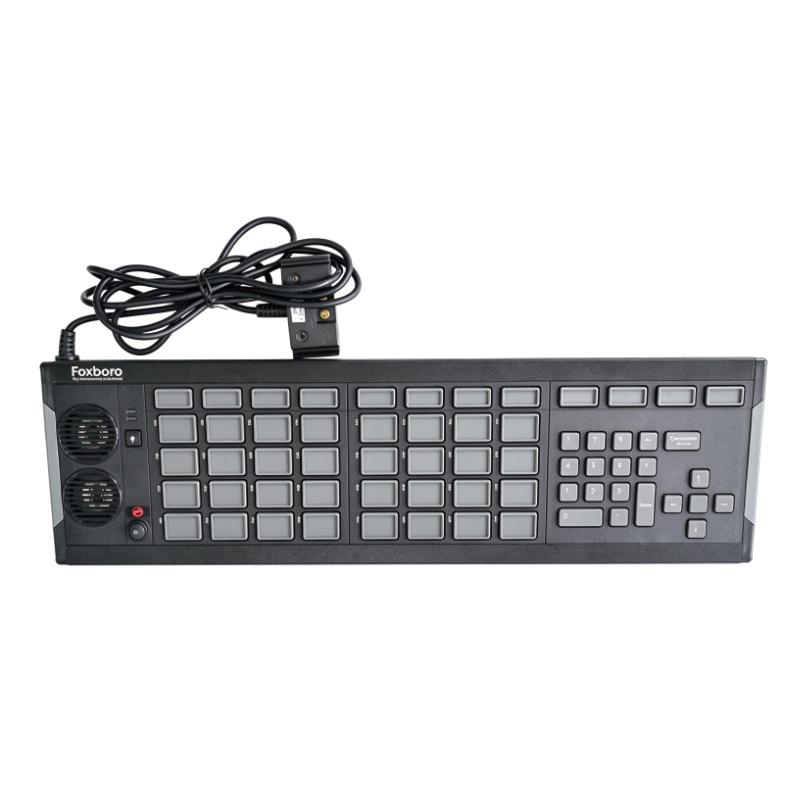
The Foxboro P0924WV is an important operator interface peripheral developed for industrial process monitoring and control applications. Designed for the Foxboro I/A Series DCS platform, it combines annunciator functionality and numeric keyboard operations to provide operators with a convenient way to interact with process control systems.
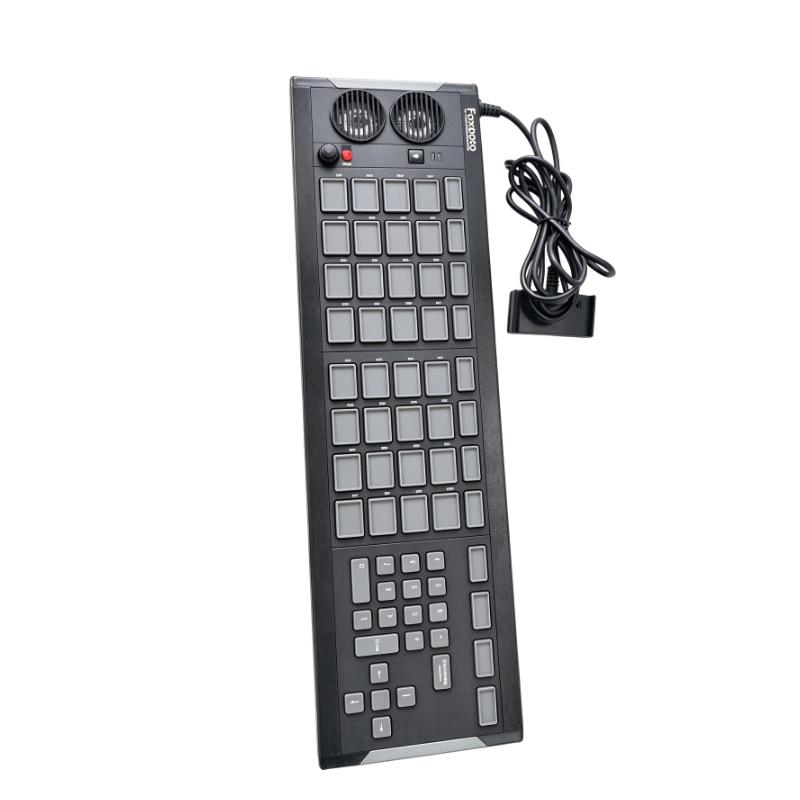
Unlike standard input devices, the P0924WV is designed around the requirements of industrial control room operations. Its annunciator section features multiple rows of keys with individual LED indicators, enabling operators to identify alarm conditions through configurable visual signals. The additional numeric and navigation keys support direct data entry and workstation interaction.
The device also incorporates dedicated Silence Horn and Lamp Test buttons. These functions help operators manage audible notifications and allow maintenance personnel to verify indicator performance. Twelve macro keys provide additional flexibility for frequently used workstation commands.
USB connectivity simplifies integration with compatible operator workstations, while the keypad's dedicated industrial design makes it suitable for established process control environments.
For facilities maintaining Foxboro I/A Series DCS installations, the P0924WV represents a valuable replacement and spare-parts option. Its combined alarm indication and operator input capabilities help preserve familiar control room workflows and support reliable human-machine interaction.
Whether used in petrochemical plants, power stations or other process industries, the Foxboro P0924WV provides practical functionality for alarm management and centralized industrial operations.
Technical Specifications
Parameter
Specification
Brand
Foxboro
Model
P0924WV
Product Type
USB Annunciator / Numeric Keypad
System Compatibility
Foxboro I/A Series DCS
Interface
USB
Key Configuration
4 Rows × 8 Keys + 12 Macro Keys
LED Indicators
Red / Yellow / Green / Off
Navigation Functions
Arrow Keys and Select Key
Special Functions
Silence Horn / Lamp Test
Alarm Function
Visual and Audible Annunciation
Macro Keys
12
Alarm Relay
Two-Pole Relay
Power Supply
USB-Powered
Operating System Support
Windows 7 / Windows Server 2008 R2
Connection Extension
Up to 30.5 m with dedicated extension kit
Installation
Desktop / Control Console
Dimensions (W × H × D)
501.65 × 36.83 × 147.32 mm
Weight
1.66 kg / 3.66 lb
Recommended Related Models
The following Foxboro models are relevant to annunciator keyboards and operator interface applications. Their interface types and workstation compatibility should be checked before selecting replacement equipment.
Model
Product Description
Application
P0924TT
USB Annunciator Keyboard
Visual and audible alarm indication
P0903CW
Serial/GCIO Annunciator Numeric Keyboard
Operator alarm and numeric input
P0903CV
Serial/GCIO Annunciator Keyboard
Industrial alarm annunciation
P0924WV
USB Annunciator Numeric Keypad
Combined alarm indication and numeric input
Popular Related Models
For Foxboro I/A Series DCS maintenance, workstation replacement and control room spare-parts procurement, the following models are also worth considering:
Model
Product Description
P0924WV
USB Annunciator Numeric Keypad
P0924TT
USB Annunciator Keyboard
P0903CW
Serial/GCIO Annunciator Numeric Keyboard
P0903CV
Serial/GCIO Annunciator Keyboard
Selecting the correct Foxboro operator interface equipment is essential for maintaining consistent alarm management and workstation functionality. For replacement projects, verifying the keyboard interface, workstation configuration and software compatibility helps ensure a smooth integration with existing I/A Series DCS installations.
Applications
The Foxboro P0924WV USB Annunciator Numeric Keypad is a specialized operator interface device designed for Foxboro I/A Series Distributed Control Systems (DCS). It combines visual alarm indication, audible alarm notification, numeric data entry and programmable macro functions in one integrated workstation peripheral.
By providing operators with direct access to alarm information and essential control commands, the P0924WV helps improve operational awareness and response efficiency in industrial control rooms.
Typical application areas include:
Oil and Gas Industry: Supports alarm monitoring and operator interaction in refinery and pipeline control rooms.
Petrochemical Plants: Provides visual and audible process alarm indication for continuous production operations.
Power Generation: Assists operators in monitoring equipment status and responding to abnormal operating conditions.
Chemical Processing: Supports alarm acknowledgement, numerical parameter entry and workstation operations.
Water Treatment Facilities: Provides an effective operator interface for centralized process monitoring.
Industrial DCS Control Rooms: Integrates with compatible Foxboro I/A Series operator workstations for centralized alarm management and process supervision.
Advantages
1. Integrated Alarm and Numeric Input Functions
The P0924WV combines annunciator functions with numeric data entry capabilities, allowing operators to monitor alarms and enter process information through a single workstation peripheral.
2. Configurable LED Status Indication
Most annunciator keys feature individual LED indicators supporting red, yellow, green and off states. These indicators provide clear visual feedback according to the configured process and alarm conditions.
3. Dedicated Alarm Control Buttons
The integrated Silence Horn and Lamp Test buttons allow operators to manage audible alarms and verify LED indicator operation without navigating through multiple software screens.
4. Programmable Macro Keys
Twelve dedicated macro keys provide convenient access to frequently used workstation commands and predefined operations, helping reduce repetitive operator actions.
5. Convenient USB Connectivity
The USB interface provides a straightforward connection to compatible operator workstations. The device can connect directly to a host USB port or through an appropriate USB hub.
6. Improved Operator Efficiency
The combination of navigation keys, numeric input, alarm indication and programmable functions provides a practical operating interface for industrial process control environments.
7. Flexible Installation Options
The keypad can be positioned on an operator desk or incorporated into a suitable control console, allowing flexible integration into existing control room layouts.
Technical FAQs
Q1: What is the primary function of the Foxboro P0924WV?
The P0924WV is a USB annunciator and numeric operator keyboard designed for Foxboro I/A Series DCS workstations. It provides alarm indication, audible notifications, numeric input and programmable macro operations.
Q2: What is the difference between the P0924WV and a standard computer keyboard?
Unlike a conventional keyboard, the P0924WV incorporates dedicated alarm annunciator keys with individual LED indicators, alarm control buttons and programmable macro functions. It is specifically designed for industrial DCS operator interaction.
Q3: How does the LED alarm indication function work?
The workstation software controls the individual LED indicators according to configured process conditions. Each supported indicator can display red, yellow, green or off states, with flashing behavior available for alarm notification.
Q4: What is the purpose of the Silence Horn button?
The Silence Horn button allows operators to silence the audible alarm signal when an alarm occurs. It helps reduce unnecessary noise while allowing operators to continue monitoring the corresponding visual alarm indications.
Q5: What does the Lamp Test button do?
The Lamp Test function illuminates the LED indicators simultaneously, allowing maintenance personnel to check the operation of the annunciator lights and identify defective indicators.
Q6: Can the P0924WV be connected through a USB hub?
Yes. It can connect directly to a workstation USB port or through a suitable USB hub. The connection must comply with the system's USB requirements. It cannot be connected through a Remote Graphics Unit (RGU).
Q7: Can the P0924WV operate together with a serial/GCIO annunciator keyboard?
No. The workstation supports either a USB annunciator keyboard or a serial/GCIO annunciator keyboard, not both simultaneously. A workstation configured for the P0924WV also has restrictions regarding serial card and GCIO interface module installation.
Q8: What operating systems support the P0924WV?
The documented operating system support includes Windows 7 and Windows Server 2008 R2. Compatibility should be checked against the installed I/A Series workstation software and hardware configuration before deployment.
Q9: What should technicians check if the keypad is not recognized by the workstation?
First, inspect the USB cable and connection port. Then verify that the workstation recognizes the connected device, check the supported operating system and software configuration, and confirm that the USB connection is not routed through an unsupported interface.
Q10: What should be checked if the LED indicators or keys do not respond correctly?
Use the Lamp Test function to verify the LED indicators, inspect the USB connection and check the workstation configuration. If individual keys remain unresponsive, further inspection of the keypad hardware and associated software configuration may be necessary.