Allen-Bradley 1747-SCNR SLC500 ControlNet Scanner Module Installation Guide (Setup & Commissioning)
Allen-Bradley 1747-SCNR SLC500 ControlNet Scanner Module installation issues are usually caused by incorrect network configuration, node address conflicts, or improper I/O mapping rather than a defective scanner module. In many legacy SLC 500 automation systems, the module powers up normally but remote ControlNet devices fail to exchange data because the scanner configuration does not match the actual network structure.
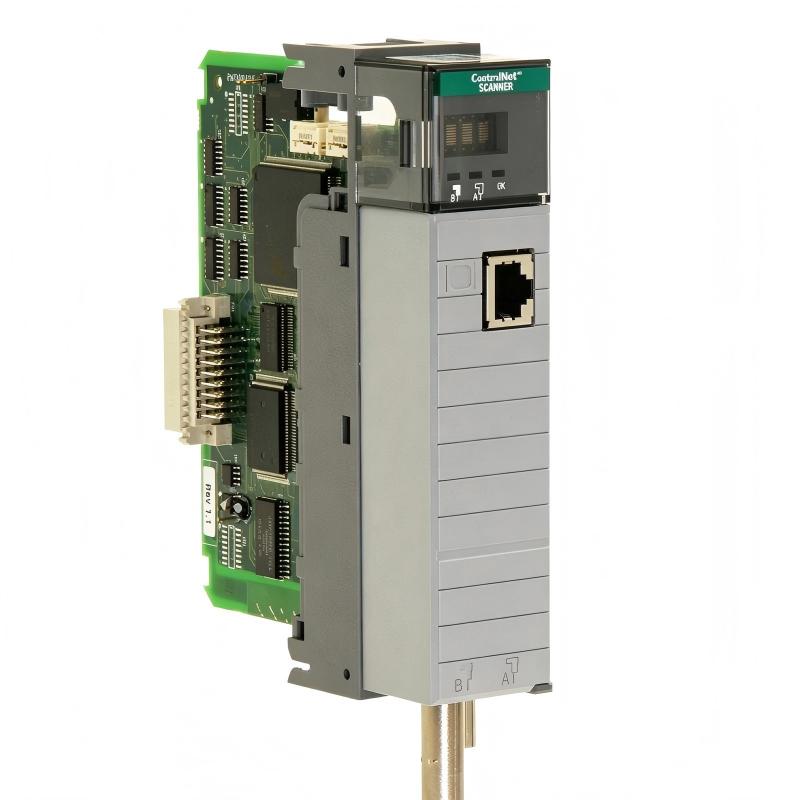
The Allen-Bradley 1747-SCNR ControlNet Scanner Module is designed to connect an SLC500 PLC system with ControlNet remote I/O devices, allowing deterministic communication between the processor and distributed field equipment. It is commonly applied in manufacturing lines, process equipment, and machine control systems where stable remote I/O communication is required.
Allen-Bradley 1747-SCNR ControlNet Scanner Module Application Overview
The 1747-SCNR works as the communication bridge between the SLC500 processor and ControlNet network devices.
Typical system structure:
SLC500 Processor
        |
1747-SCNR Scanner Module
        |
ControlNet Network
        |
Remote I/O Adapter / Drives / Controllers
Common applications include:
- Distributed I/O cabinets
- Conveyor automation systems
- Packaging machines
- Process control skids
- Remote motor control stations
In one automotive production line upgrade project, an SLC 5/04 controller was connected to multiple remote I/O racks through a 1747-SCNR module.
During initial commissioning:
- PLC processor status: RUN
- Scanner module status: Normal
- Remote I/O nodes: Offline
The maintenance team initially suspected failed remote adapters. However, engineering analysis showed that the ControlNet schedule did not match the updated node configuration.
After correcting the network configuration, all remote stations returned online without replacing any hardware.
Allen-Bradley 1747-SCNR Installation Preparation and System Configuration Check
Before installing the ControlNet scanner module, engineers should verify the complete control architecture.
Important preparation items:
- Confirm SLC500 chassis compatibility
- Check available installation slot
- Verify processor communication capability
- Confirm ControlNet node planning
- Prepare PLC programming software configuration
A practical installation checklist:
| Inspection Item | Engineering Requirement |
|---|---|
| Chassis power | Remove power before module installation |
| Module position | Correct SLC rack slot |
| Node address | Unique ControlNet address |
| Network cable | Proper connection and termination |
| PLC program | Matching scanner configuration |
A common field mistake is installing the module correctly but forgetting that the PLC project still contains the previous scanner configuration.
Allen-Bradley 1747-SCNR ControlNet Wiring and Network Installation
ControlNet communication stability depends heavily on physical network quality.
During installation, check:
- ControlNet cable condition
- Connector tightness
- Shield grounding
- Network termination
- Cable routing near high-power equipment
In one chemical processing application, engineers found intermittent remote I/O communication loss.
Measured conditions:
Before repair:
- Network dropout frequency: 20–30 times/day
- Remote output response delay: 1–2 seconds
Investigation results:
- Scanner module status remained healthy
- ControlNet cable connection showed mechanical looseness
After repairing the connector:
- Communication remained stable for 7 days
- No remote I/O timeout occurred
The fault was caused by communication infrastructure, not the 1747-SCNR hardware.
Allen-Bradley 1747-SCNR SLC500 PLC Configuration and I/O Setup
The scanner module must be correctly configured inside the SLC500 control program.
Important configuration areas:
- Module slot assignment
- Input/output data mapping
- ControlNet node assignment
- Communication status monitoring
A typical control strategy:
IF Scanner_Status = Healthy
AND Remote_IO_Status = Ready

THEN
Enable Machine Operation
This prevents the machine from running when remote devices are unavailable.
During commissioning, engineers should verify:
- Scanner status words
- Remote input updates
- Output command response
- Communication fault bits
A frequent commissioning issue is that the PLC logic is correct, but the data table addresses do not match the actual remote I/O configuration.
Allen-Bradley 1747-SCNR ControlNet Commissioning and Validation Testing
Successful commissioning requires testing the complete communication chain.
Network Validation
Check:
- All ControlNet nodes online
- Stable communication update
- No repeated fault counters
Functional Testing
Verify:
- Remote input signals
- Remote output commands
- Machine sequence operation
Example commissioning data:
Initial condition:
- Remote I/O refresh delay: 1.2 seconds
- Communication retry events: 35/hour
After configuration correction:
- Refresh delay: below 50 ms
- Communication retry events: 0
Field experience shows that a 1747-SCNR installation is only complete when the PLC, scanner module, network, and remote devices operate as one system.