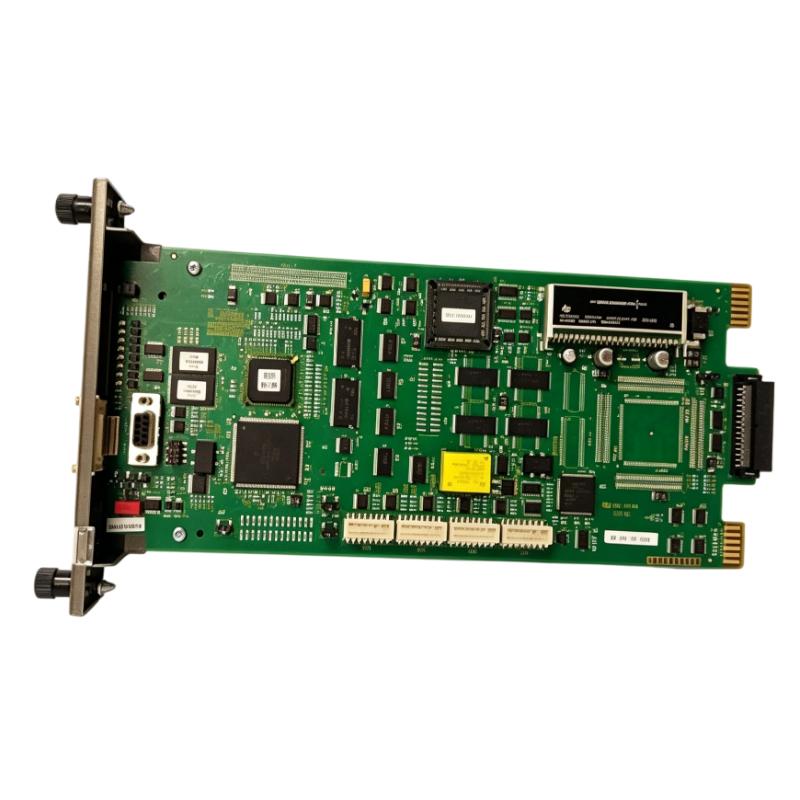
ABB Bailey INICI03 Cnet-to-Computer Communication Interface Module Installation Guide (Setup & Commissioning)
ABB Bailey INICI03 Cnet-to-Computer Communication Interface Module installation issues are usually caused by incorrect rack configuration, communication parameter mismatch, improper cable connection, or incorrect interface module addressing rather than hardware failure. In Bailey INFI 90 and Symphony control systems, the INICI03 works as a communication bridge between the Cnet Control Network and host computers, allowing higher-level systems to access process data.
The ABB Bailey INICI03 Cnet-to-Computer Communication Interface Module is designed for industrial DCS communication applications where computer systems or operator stations require access to Bailey Cnet network data. The interface normally works with related communication modules to transfer information between the Cnet network and external computer systems through SCSI or serial communication interfaces.
ABB Bailey INICI03 Cnet Communication Interface Module Application Overview
The INICI03 provides a communication path between the Bailey distributed control system network and external computer platforms.
Typical system architecture:
 id="inici03_arch"
Bailey INFI 90 / Symphony DCS Network
                |
                |
             Cnet Network
                |
                |
ABB Bailey INICI03 Interface Module
                |
                |
     Computer / HMI / Engineering Station
Main functions:
- Cnet data access
- Host computer communication
- DCS information exchange
- Operator interface connection
- Historical and supervisory data transfer
Typical applications:
- Power generation plants
- Chemical processing systems
- Oil and gas facilities
- Industrial automation networks
- Large process control systems
The INICI03 is commonly used where legacy Bailey control systems require reliable communication with computer-based monitoring platforms.
In one power plant modernization project, engineers integrated an ABB Bailey INICI03 interface into an existing INFI 90 control network.
During commissioning:
- Cnet network status: Normal
- DCS controllers: Running normally
- Computer communication: Failed
The first assumption was a defective communication module.
The engineering team performed a structured investigation:
- Checked rack installation
- Verified module addressing
- Tested communication cables
- Reviewed computer interface settings
Measured conditions:
Before correction:
- Cnet communication: Active
- Host computer connection: No response
- Serial communication test: Failed
Further inspection found that the communication parameters between the computer interface software and the INICI03 module were inconsistent.
After correcting the configuration:
- Computer connection recovered
- DCS data became available
- Communication remained stable during operation
The problem was caused by setup configuration, not module failure.
ABB Bailey INICI03 Installation Preparation and System Planning
Before installing the INICI03 communication interface module, engineers should evaluate the complete DCS communication structure.
Preparation requirements:
- Confirm Bailey system architecture
- Check rack compatibility
- Verify communication module combination
- Prepare interface cables
- Confirm host computer settings
Installation checklist:
| Inspection Item | Engineering Requirement |
|---|---|
| Rack position | Correct communication rack location |
| Module combination | Compatible interface modules |
| Network address | Correct configuration |
| Cable connection | Proper communication wiring |
| Host system | Matching communication parameters |
The INICI03 installation is different from standard I/O modules.
Engineers must consider:
- Network topology
- Communication protocol
- Host interface type
- Data transfer requirements
Incorrect communication planning can create intermittent failures that appear to be hardware problems.
ABB Bailey INICI03 Hardware Installation and Communication Wiring
Proper physical installation is essential for stable communication.
Rack Installation Check
Verify:
- Module seating position
- Rack power availability
- Backplane connection
- Module status indicators
Cnet Network Connection
Check:
- Network cable condition
- Connector reliability
- Communication path integrity
Computer Interface Connection
Verify:
- SCSI or serial interface connection
- Cable shielding
- Connector condition
In one field installation case:
Initial condition:
- INICI03 module powered normally
- DCS network healthy
- Computer unable to read process data
Engineering inspection found:
- Module hardware was normal
- Communication cable shielding was damaged
After replacing the communication cable:
- Data transfer recovered
- Communication errors disappeared
ABB Bailey INICI03 Setup and System Configuration
The configuration stage determines whether the computer system can correctly access Cnet data.
Important configuration areas:
- Module address settings
- Communication interface selection
- Host software configuration
- Data access parameters
Typical communication logic:
 id="inici03_logic"
IF Cnet_Status = Normal
AND Module_Address = Correct
AND Host_Interface = Matched

THEN

Enable Computer_Data_Access
Engineers should verify:
- Network status
- Data transmission
- Computer response
- Error messages
During commissioning, engineers should avoid changing multiple parameters simultaneously because it makes fault isolation difficult.
ABB Bailey INICI03 Commissioning Validation and Performance Testing
Final commissioning should confirm communication stability under real operating conditions.
Communication Test
Verify:
- Network connection
- Data update speed
- Host computer response
System Operation Test
Check:
- Process data display
- Alarm transmission
- Engineering access
Example commissioning results:
Before optimization:
- Computer connection unstable
- Data refresh interrupted
- Communication alarms appeared
After correction:
- Stable Cnet communication
- Continuous data transfer
- Reliable operator monitoring
A successful ABB Bailey INICI03 installation requires correct rack integration, communication configuration, and systematic commissioning.