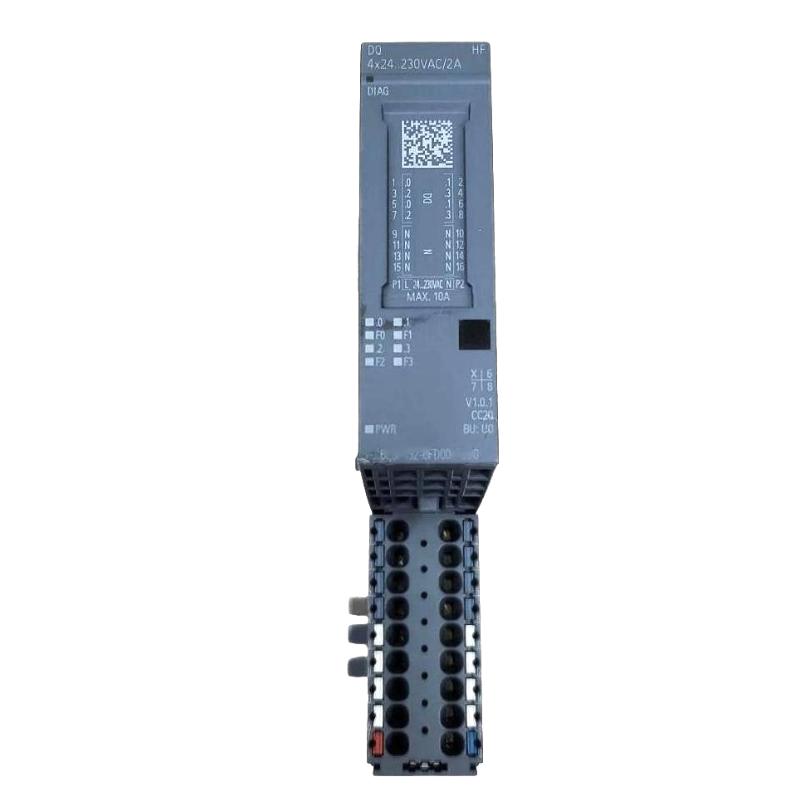
Siemens 6AG2132-6FD00-4CU0 Digital Output Module Troubleshooting Guide (Output Channel Fault Diagnosis)
Introduction
When a Siemens 6AG2132-6FD00-4CU0 Digital Output Module fails to operate a connected actuator, the cause may be an output-channel problem, an incorrect load supply, excessive current demand, faulty field wiring, or a PLC logic condition. Effective troubleshooting starts by separating the control command from the electrical output and the final load response.
The precise electrical limits, channel arrangement, and diagnostic capabilities of this model should be confirmed from its product documentation. The procedures below provide a systematic approach without assuming unverified channel ratings or protection functions.
1. Identify the Type of Output Failure
Before changing wiring or replacing the module, determine exactly what the output is doing.
Common symptoms include:
The PLC command is active, but the actuator does not operate.
The output operates initially and then becomes unavailable.
A connected load switches intermittently.
The PLC output status changes, but the field device does not respond.
A module or channel diagnostic appears after a load is connected.
The output remains active when the application logic is expected to turn it off.
Record the affected channel, PLC command state, relevant diagnostic messages, and the operating conditions when the problem occurs. Determine whether the fault affects one channel or several channels sharing the same supply or output group.
2. Check the PLC Command Before Testing the Hardware
An inactive physical output does not automatically indicate a damaged module.
Monitor the relevant PLC variable or output address in the engineering software. Confirm that the logic conditions required to energize the output are satisfied and that no interlock, permissive, sequence condition, or safety-related control is preventing the command.
Check whether another program block overwrites the output value later in the scan. Also verify that the configured address corresponds to the physical channel being tested.
If the PLC command never becomes active, investigate the program, input conditions, operating mode, and interlocks first. Electrical measurements on the output alone will not identify a missing software command.
Never bypass a safety function or force an output to operate when doing so could create a hazardous machine state.
3. Measure the Output and Load Supply
If the PLC command is active, move to the electrical circuit.
Use the verified wiring diagram to identify the correct measurement points. Under approved test conditions, measure the relevant load supply and output voltage, comparing both with the module's specified operating limits.
A practical diagnostic sequence is:
Confirm that the required load supply is present.
Check whether the supply remains stable when the load is commanded on.
Measure the output using the correct reference points for the circuit.
Compare the measured result with the expected state and documented output behavior.
If the output voltage appears normal but the actuator does not operate, investigate the load, return path, wiring, and connection points.
Use a suitable meter and safe test procedure. A voltage measurement without a load may not reveal a high-resistance connection or a circuit that collapses under load. Never create an improvised short circuit to test output capability.
4. Investigate Overload and Load Compatibility
A digital output can fail to operate correctly when the connected load exceeds the documented electrical limits or has unsuitable switching characteristics.
Review the load's rated voltage, steady-state current, inrush current, and inductive characteristics. For example, a solenoid valve or contactor coil may draw a higher initial current than its normal holding current. Compare the actual demand with the module's channel and group limits, accounting for any derating requirements.
If the fault occurs only when several outputs switch simultaneously, examine the combined load on the relevant supply or output group. A supply that is adequate for individual loads may be insufficient for the actual operating sequence.
Do not repeatedly reset or re-energize a circuit suspected of overloading the output. Isolate the cause and correct the load or protection arrangement before further testing.
5. Check Wiring, Terminals, and the Connected Device
Intermittent output behavior can originate outside the PLC module.
With power isolated, inspect the affected terminal, conductor, connector, and load wiring. Look for loose connections, broken strands, damaged insulation, incorrect terminal assignment, and signs of overheating. Verify the load's return path and any common connections required by the circuit.
If permitted by the maintenance procedure, test the field device independently using an appropriate, current-limited test arrangement that matches its rated voltage and current. Do not apply an external supply to a PLC output terminal unless the manufacturer's documentation explicitly permits that test.
Where a field device is defective, replacing the module will not resolve the underlying fault. Where wiring or a terminal is intermittent, the symptom may disappear temporarily after handling the cable and then return during machine vibration.
6. Field Case: Output Stops After Several Actuators Operate
Consider a packaging machine where one output controls a solenoid valve correctly during startup but stops responding after several other actuators are activated. The PLC command remains active, and the problem is initially suspected to be a failed output channel.
The engineer compares the load behavior with the documented output and supply limits. Measurements taken during the sequence show that the shared load supply drops below its required operating range when multiple actuators energize.
The investigation then focuses on the common supply, protective devices, wiring connections, and aggregate load demand. After the underlying supply-capacity or connection issue is corrected, the team repeats the sequence with the same combination of loads.
The key diagnostic lesson is that a channel that fails only under combined load conditions should prompt an investigation of shared electrical resources before the module is replaced.
7. Use Diagnostics to Distinguish Channel and System Faults
Review the available PLC and module diagnostics after collecting the electrical measurements. Record the exact diagnostic text and whether it appears during startup, when a particular load switches, or after a sustained operating period.
Use the pattern of affected channels to narrow the investigation:
Fault pattern | Possible cause | Recommended check |
|---|---|---|
One output never operates | Address mismatch, wiring fault, load failure, or channel fault | Verify command, wiring, and output measurements |
Several outputs fail together | Shared load supply or common wiring problem | Measure the common supply under load |
Output fails when a specific actuator switches | Excessive inrush, short circuit, or incompatible load | Check load characteristics and circuit condition |
Output works intermittently during vibration | Loose terminal or damaged conductor | Inspect and test the isolated wiring |
PLC command remains inactive | Logic condition, interlock, or address issue | Monitor the program and relevant conditions |
Output status changes but load does not respond | Supply, return path, wiring, or load problem | Test the complete field circuit |
These are diagnostic possibilities, not proof of a specific defect. Use the module's documented diagnostic functions and the actual measurements to determine the cause.
8. When to Replace the Digital Output Module
Consider replacing the Siemens 6AG2132-6FD00-4CU0 only after the control command, wiring, load supply, connected device, and documented operating limits have been checked.
Before replacement:
Save the relevant diagnostic records.
Record the original wiring and channel assignments.
Verify the replacement module's compatibility.
Follow the required shutdown and electrical isolation procedure.
Inspect the connected load for the condition that may have caused the original fault.
After replacement, repeat the individual channel test and the operating sequence that previously produced the failure. If the same symptom returns, investigate the external circuit or system configuration instead of assuming that the replacement is also defective.
9. Troubleshooting and Maintenance Recommendations
A reliable fault diagnosis should end with a verified cause, not merely a cleared alarm. Record the affected channel, observed PLC command, supply measurements, load characteristics, diagnostic messages, corrective action, and final test results.
For recurring faults, trend the supply voltage during switching, review the aggregate load demand, and inspect high-use terminals during scheduled maintenance. Ensure that technicians use the correct model documentation rather than transferring voltage, current, or wiring assumptions from a different Siemens output module.
By separating PLC logic, electrical supply, field wiring, load behavior, and module diagnostics, maintenance teams can identify the actual failure mechanism and reduce unnecessary module replacement and production downtime.