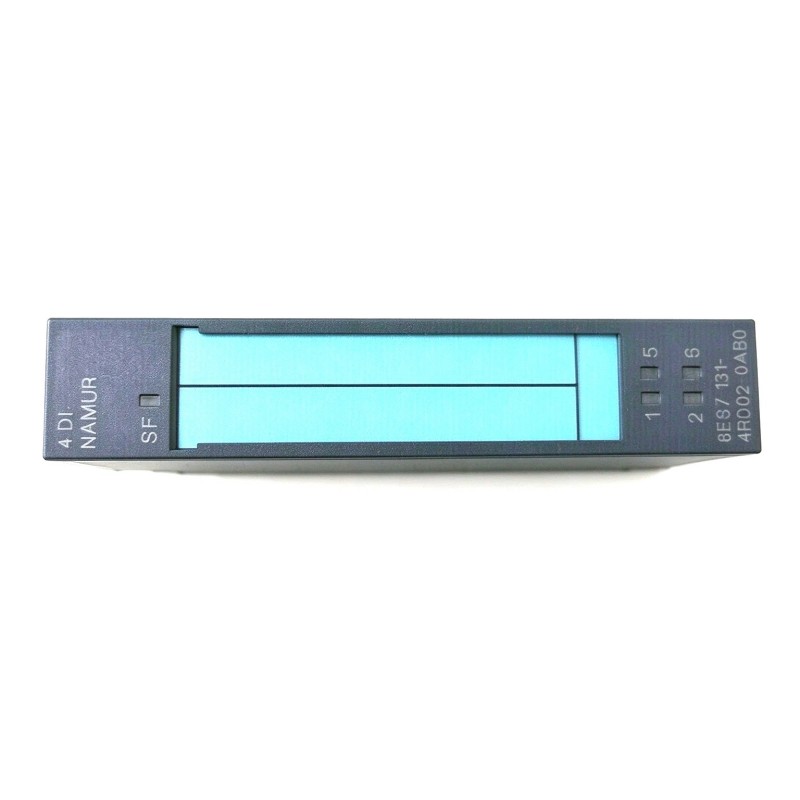
Siemens 6ES7131-4RD02-0AB0 Digital Input Electronic Module Installation Guide (Wiring, Configuration & Commissioning)
Introduction
The Siemens 6ES7131-4RD02-0AB0 Digital Input Electronic Module is used in industrial automation systems to acquire discrete signals from field devices and make their states available to the control system. Correct installation is essential for reliable signal acquisition, accurate PLC input mapping, and stable operation of sensors, switches, and other digital signal sources.
This installation guide covers hardware preparation, wiring verification, input configuration, commissioning tests, and practical troubleshooting prevention. Before installation, verify the module's exact input characteristics, supported ET 200 system configuration, signal voltage requirements, and terminal assignments against the applicable Siemens documentation.
1. Pre-Installation Checks for the Siemens 6ES7131-4RD02-0AB0
Before installing the electronic module, confirm that the selected hardware matches the automation project's requirements.
Check the following items:
Order number: Verify that the product label matches 6ES7131-4RD02-0AB0.
System compatibility: Confirm the supported ET 200 station, interface module, terminal base, and mounting arrangement.
Input specifications: Verify the supported signal type, rated input voltage, channel configuration, and input characteristics.
Field-device compatibility: Confirm that connected sensors and switches provide signals suitable for the module.
Engineering configuration: Check the hardware catalog entry, firmware requirements, and supported engineering software.
Physical condition: Inspect the module and its contacts for damage, contamination, or deformation.
For replacement work, record the existing channel assignments and PLC addresses before disconnecting any wiring. This helps prevent an installation from introducing an input-mapping error.
2. Installing the Digital Input Electronic Module
Before handling the module, isolate the relevant power sources and follow the site's lockout/tagout procedures. Confirm that the equipment is in a safe condition before removing or inserting electronic components.
Installation procedure
Identify the intended mounting position using the approved station layout.
Verify that the compatible terminal base or mounting interface is installed correctly.
Inspect the contacts and mechanical guides for damage or contamination.
Insert the electronic module using the specified installation procedure without applying excessive force.
Confirm that the module is seated and secured.
Connect field wiring according to the verified terminal diagram.
Check wire identification, terminal tightness, and signal-reference connections.
Compare the completed installation with the electrical drawings before restoring power.
Keep sensor wiring away from high-current switching cables where practical. Where shielding or grounding is required, follow the installation rules for the actual system and sensor interface.
3. Digital Input Wiring and Signal Verification
Correct wiring is essential for the module to interpret field-device states reliably. A sensor can be powered and operational while its signal is connected to the wrong input channel or reference terminal.
Before commissioning, verify:
The field device is connected to the intended input channel.
The sensor's output type is compatible with the input circuit.
The required signal supply and reference connections are present.
The conductor and terminal assignments match the electrical drawings.
The input signal falls within the module's documented electrical limits.
Any required common connections are correctly arranged.
Do not assume that every digital input module uses the same voltage range, input polarity, or wiring scheme. Confirm the specifications for the exact 6ES7131-4RD02-0AB0 variant before applying a field signal.
4. Configuring the Siemens 6ES7131-4RD02-0AB0 in the PLC Project
After installation, verify the module configuration in the applicable Siemens engineering environment.
Select the correct hardware catalog entry and confirm that the electronic module is assigned to the intended station and mounting position. Check the configured input address range against the PLC program and electrical drawings.
Review the following configuration items:
Hardware identification and compatibility.
Input address allocation.
Channel-to-sensor mapping.
Relevant diagnostic settings, where supported.
Firmware and engineering software requirements.
Any documented input filtering or parameter settings applicable to the module.
Input filtering and delay settings should be selected according to the actual application. Excessive filtering may delay the recognition of a short signal, while insufficient filtering may allow electrical noise or contact bounce to create unwanted state changes.
Before downloading configuration changes to a running system, follow the site's change-control procedures and assess the potential impact on machine operation.
5. Commissioning and Functional Testing
Commissioning should verify that each field signal is correctly represented in the PLC.
Test item | Test method | Expected result |
|---|---|---|
Hardware recognition | Check engineering diagnostics | Correct module identification |
Sensor supply | Measure at approved test points | Within the sensor's specified operating range |
Input signal | Activate the field device under safe conditions | Signal changes according to the device's operation |
Channel mapping | Compare the physical input with the PLC address | Correct input variable changes |
Signal stability | Observe the input during repeated operation | No unexplained state changes |
Diagnostic status | Review available station and module diagnostics | No unresolved faults |
Sequence test | Run the approved operating sequence | PLC responds correctly to the field signal |
For example, when commissioning a sensor in a system designed for 24 V DC signaling, compare measured voltage with the specified input thresholds and the sensor's output characteristics. A nominal 24 V reading alone does not establish correct operation if the reference connection or channel mapping is incorrect.
Test inputs individually before running a complete machine sequence. This makes it easier to identify swapped channels, incorrect addresses, or a field device that does not produce the expected signal.
6. Field Case: Sensor Signal Appears on the Wrong PLC Input
During commissioning of a material-handling station, a proximity sensor detects a workpiece correctly, but the PLC program responds as though a different sensor has been activated.
The engineer first verifies the sensor's operation and confirms that its output changes when the workpiece enters the detection range. The next step is to compare the physical terminal assignment with the configured input address.
The investigation reveals that the sensor wiring and PLC input mapping do not match the latest electrical drawing. After the discrepancy is corrected through the approved change procedure, the engineer activates each sensor individually and verifies the corresponding PLC variable.
This case demonstrates why input mapping should be verified independently of sensor operation and module hardware status.
7. Installation Acceptance Checklist
Before returning the equipment to normal operation, confirm that:
The module order number and system compatibility are verified.
The electronic module is correctly seated in the intended position.
Field wiring matches the approved terminal diagram.
Sensor supply and signal-reference connections are correct.
Input voltage and signal characteristics meet documented requirements.
PLC addresses match the physical input channels.
Input response has been tested for each required field device.
Available diagnostics show no unresolved installation-related faults.
Configuration changes and test results are recorded.
A complete installation record provides a reliable baseline for future maintenance and signal fault diagnosis.