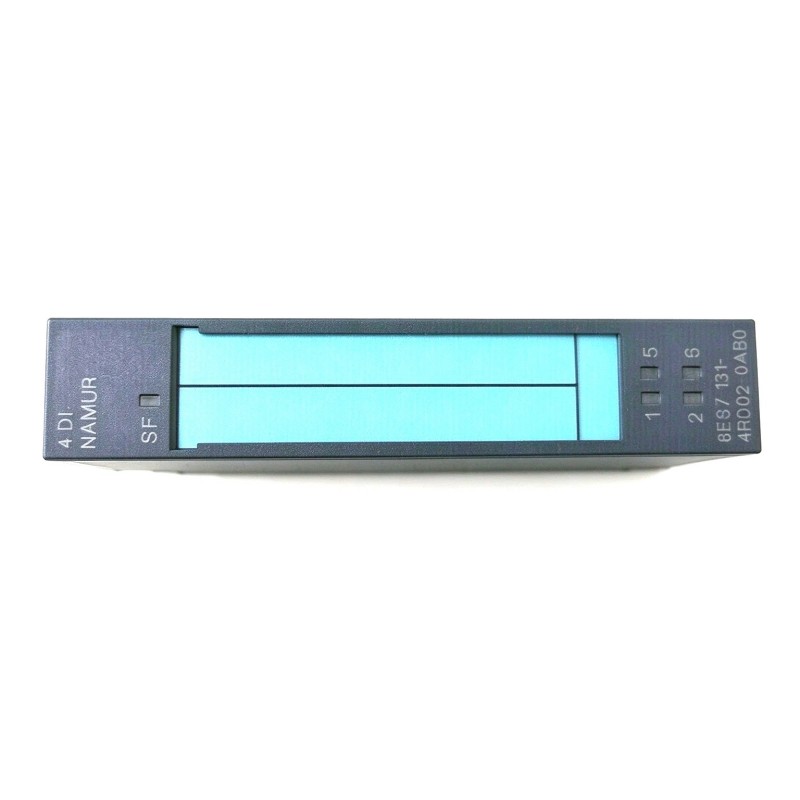
Siemens 6ES7131-4RD02-0AB0 Digital Input Electronic Module Troubleshooting Guide (Intermittent Input Signal Fault Diagnosis)
Introduction
When a Siemens 6ES7131-4RD02-0AB0 Digital Input Electronic Module reports an unstable input or fails to register a field-device signal, the cause may be a sensor problem, incorrect wiring, an unsuitable electrical signal, configuration errors, or a hardware fault. The most effective troubleshooting approach is to compare the physical signal with the input state observed by the PLC.
This guide provides a structured fault-diagnosis workflow for industrial maintenance teams. Confirm the exact module specifications and supported diagnostic functions before performing electrical measurements or changing parameters.
1. Identify the Input Signal Failure
Begin by determining whether the problem affects one input channel or several channels.
Typical symptoms include:
A sensor changes state, but the PLC input remains unchanged.
An input turns on and off without a corresponding change in the field condition.
The input works during startup but becomes unstable during production.
The physical sensor indicator changes, but the engineering software shows a different state.
Several input signals fail simultaneously.
A fault appears after a sensor, terminal, or module has been replaced.
Record the affected channel, sensor state, PLC input address, and operating conditions. If possible, capture the event timestamp and relevant diagnostic message.
This initial record helps distinguish a local sensor or wiring issue from a shared supply, configuration, or station-level problem.
2. Check the Sensor Before Suspecting the Module
A digital input module can only process the electrical signal delivered to it. Start by confirming that the field device actually generates the expected output.
Check the sensor's power supply, operating indicator, sensing distance, switching condition, and output type. For mechanical limit switches, inspect the actuator mechanism and contacts. For electronic sensors, verify that the output configuration is compatible with the input circuit.
With the machine in a safe condition, activate the sensor and measure its output at an approved test point. Compare the result with the sensor's specified output levels and the input module's documented switching thresholds.
If the sensor does not generate the expected signal, correct the sensor, its supply, or its field wiring before investigating the electronic module.
3. Compare the Electrical Signal With the PLC Input State
If the sensor appears to operate correctly, check whether its electrical signal reaches the intended module input.
Follow the verified terminal diagram and use an appropriate instrument to measure the signal relative to the correct reference point. Do not assume that a voltage measured against an arbitrary ground point accurately represents the input state.
Use the following diagnostic sequence:
Confirm that the sensor is activated under the intended operating condition.
Measure the sensor output at an approved test point.
Verify the signal at the corresponding input connection, following the applicable safety procedure.
Monitor the relevant PLC input address.
Compare the physical signal, module indication if available, and PLC variable.
Record where the observed state first differs from the expected state.
If the signal is present at the sensor but absent at the module terminal, investigate the cable, connectors, and terminal assignments. If the correct signal reaches the input but the PLC variable remains unchanged, verify the configured address, hardware setup, and available module diagnostics.
4. Diagnose Intermittent Signals and Electrical Noise
Unstable digital inputs can result from contact bounce, poor connections, electromagnetic interference, or a signal that remains too close to the input switching threshold.
Inspect the cable route and check whether input instability coincides with the operation of nearby motors, contactors, variable-frequency drives, or other switching equipment. Examine shielding, grounding, and cable separation against the requirements for the actual installation.
For mechanical contacts, consider whether contact bounce is producing multiple transitions. For electronic sensors, verify that the output type and electrical characteristics match the input module.
Where the engineering configuration supports input filtering, review the current settings and determine whether a documented adjustment is appropriate. Filtering should not be increased blindly: a long filter time can prevent the PLC from detecting short but valid signals.
Correct the underlying wiring or interference problem wherever possible instead of relying solely on software filtering.
5. Check Input Addressing and Hardware Configuration
A correctly wired signal may appear missing when the engineering project references the wrong input address.
Compare the configured module position, input address range, and channel assignment with the actual hardware layout. Confirm that the PLC program reads the address associated with the intended physical input.
After hardware replacement or project modification, verify that the configured catalog entry corresponds to the installed module and that the station diagnostics do not indicate a configuration discrepancy.
If the module supports channel-specific diagnostics, review them for relevant faults. Use the exact diagnostic descriptions available in the engineering software rather than interpreting an indicator based on assumptions from another module variant.
6. Field Case: Input Drops Out When a Machine Starts
A production machine uses a digital input from a position sensor to confirm that a moving component has reached its home position. The input works reliably during manual checks but occasionally drops out when a nearby motor starts.
The maintenance engineer first records the fault timing and monitors the PLC input state. The sensor continues to indicate the correct physical position, but the input signal becomes unstable during motor startup.
The engineer inspects the signal cable route and finds that part of the cable runs alongside a power cable. The installation is reviewed against the system's grounding, shielding, and separation requirements. The cable route is corrected under the approved maintenance procedure, and the team repeats the motor-start sequence while monitoring the input.
If the interruptions disappear, the results support an interference-related cause. If the problem persists, the next checks include sensor supply stability, terminal integrity, input thresholds, and the sensor's output characteristics.
This example illustrates why fault timing and repeatable testing can be more informative than immediately replacing the input module.
7. Troubleshooting Reference Table
Symptom | Possible cause | Recommended diagnostic action |
|---|---|---|
Sensor operates but PLC input remains off | Wiring error, wrong reference, address mismatch | Measure the signal at the input and verify the configured address |
Input changes without a physical event | Noise, contact bounce, loose connection | Inspect cable routing and connections; review filtering if supported |
Several inputs fail together | Shared sensor supply or common wiring problem | Check common power and reference connections |
Input fails during motor startup | Electrical interference or supply disturbance | Correlate fault timing and inspect cable routing and supply stability |
Fault begins after module replacement | Incorrect hardware entry or channel mapping | Compare the installed module with the project configuration |
Signal is present at the terminal but not reflected in the PLC | Incorrect mapping, configuration issue, or possible hardware fault | Verify address allocation and review diagnostics |
These are possible causes rather than definitive conclusions. Confirm each diagnosis using measured signals, configuration checks, and repeatable tests.
8. When to Replace the Electronic Module
Consider replacing the Siemens 6ES7131-4RD02-0AB0 only after verifying the sensor, field wiring, supply, reference connections, PLC addressing, and system configuration.
Before replacement, save the relevant diagnostic records and document the original wiring. Confirm that the replacement is compatible with the station and associated hardware. Follow the required isolation and handling procedures during removal and installation.
After replacement, test the affected channel using the same sensor and operating conditions that previously produced the fault. If the problem remains, continue investigating the field circuit or configuration rather than assuming the new module is defective.
9. Preventive Maintenance Recommendations
To reduce recurring digital input faults:
Inspect sensor wiring and terminals during scheduled maintenance.
Verify sensor output characteristics against the module's input specifications.
Check common sensor supplies and reference connections.
Review cable routing in areas exposed to electrical interference.
Confirm PLC input addresses after hardware or program changes.
Review input filtering against the actual signal timing requirements.
Preserve diagnostic logs for intermittent failures.
Reliable input troubleshooting depends on separating the field-device condition, electrical signal, physical channel, and PLC address. This approach helps identify the real fault location, reduce unnecessary module replacement, and restore stable signal acquisition in industrial automation systems.