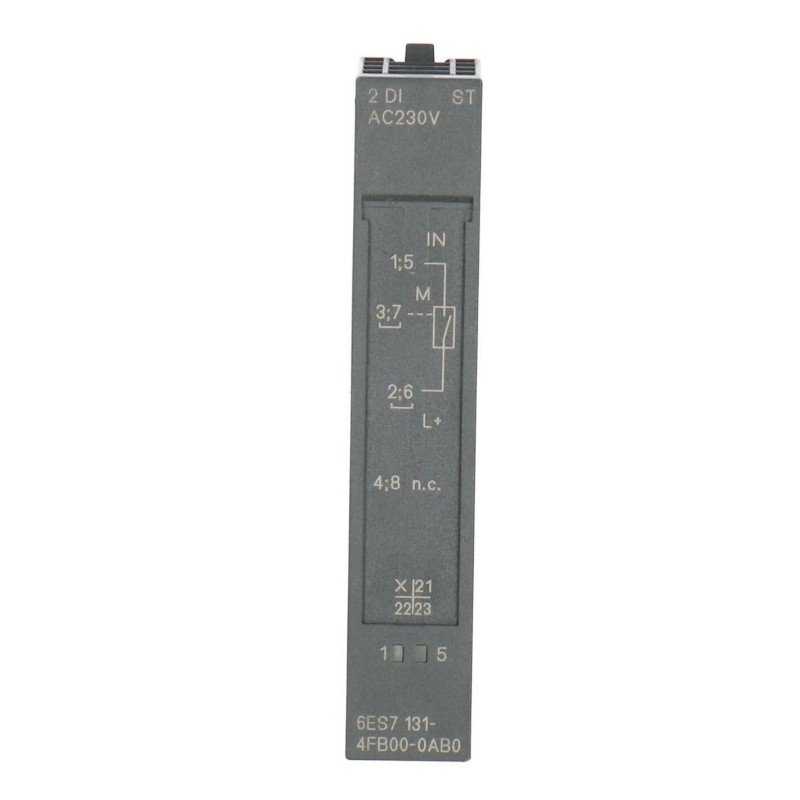
Siemens 6ES7131-4FB00-0AB0 Digital Input Electronic Module Installation Guide (Wiring, Setup & Commissioning)
Introduction
The Siemens 6ES7131-4FB00-0AB0 Digital Input Electronic Module is designed for digital signal acquisition in industrial automation applications. Correct installation and configuration help ensure that field signals are detected reliably and transferred to the PLC program with the intended channel assignments. This installation guide covers hardware preparation, electrical connections, input mapping, commissioning tests, and practical measures for avoiding common installation errors.
Before installation, verify the exact module specifications, supported ET 200 system configuration, input voltage characteristics, terminal assignments, and compatibility requirements against the applicable Siemens documentation. Do not assume that wiring details or electrical limits are interchangeable with those of other digital input modules.
1. Pre-Installation Checks
Before mounting the Siemens 6ES7131-4FB00-0AB0, confirm that the module matches the approved automation system design.
Check the following:
Order number: Verify the complete product designation on the module label.
Hardware compatibility: Confirm the supported station, interface module, terminal base, and mounting arrangement.
Input characteristics: Check the documented signal voltage, input thresholds, channel arrangement, and electrical requirements.
Field-device compatibility: Ensure that connected sensors, push buttons, and limit switches provide suitable signals.
Engineering environment: Verify the correct hardware catalog entry and any documented software or firmware dependencies.
Physical condition: Inspect the housing, contacts, and mounting features for damage or contamination.
For replacement installations, record the original wiring and input address assignments before disconnecting the existing hardware. This information is useful when validating the replacement and investigating any subsequent signal discrepancies.
2. Hardware Installation and Wiring
Isolate the relevant power sources and follow the site's lockout/tagout procedures before installing or wiring the module. Confirm that the equipment is safe to work on before handling terminals or electronic components.
Installation procedure
Identify the designated module position using the approved station layout.
Confirm that the compatible mounting base or terminal unit is correctly installed.
Inspect the module interface and contacts for damage.
Fit the electronic module according to the manufacturer's installation procedure.
Confirm that the module is properly seated and secured.
Connect field signals according to the verified terminal diagram.
Check the signal supply, common-reference connections, conductor identification, and terminal tightness.
Compare the completed wiring with the electrical drawings before restoring power.
Route low-level sensor wiring away from high-current switching conductors where practical. If the installation requires cable shielding or specific grounding arrangements, follow the requirements for the actual system and connected devices.
3. Verify Field Signal Compatibility
A digital input module can register a signal correctly only when the electrical characteristics of the field device are compatible with its input circuit.
Before commissioning, confirm that:
The sensor or switch uses a compatible output type.
The signal voltage falls within the specified operating range.
The signal reference and common connections are correct.
Each field device is wired to its intended input channel.
Cable lengths and installation conditions comply with the system requirements.
Any external signal-conditioning components are suitable for the application.
For electronic sensors, check the output configuration and switching behavior. For mechanical contacts, inspect contact condition and confirm that the connected circuit produces a valid input state.
Do not apply a generic voltage or terminal assignment based solely on another Siemens module with a similar appearance. The exact electrical specifications for 6ES7131-4FB00-0AB0 must govern the installation.
4. Configure the Siemens 6ES7131-4FB00-0AB0 in the PLC Project
Once the hardware has been installed, check the engineering project to ensure that the configured module corresponds to the physical device.
In the applicable Siemens engineering environment, verify the selected hardware entry, station position, input address range, and channel mapping. Confirm that the PLC program reads the addresses associated with the actual field devices.
Review the following configuration items:
Correct hardware identification.
Input address allocation.
Channel-to-sensor assignments.
Relevant diagnostic settings, where supported.
Firmware and engineering software compatibility.
Applicable input-filtering or parameter settings.
Input filtering should reflect the signal timing requirements of the application. If filtering is too aggressive, short valid pulses may be missed. If filtering is insufficient for a noisy or bouncing signal, the PLC may register unwanted transitions.
Before downloading configuration changes, follow the site's change-management procedure and assess the potential impact on machine operation.
5. Commissioning and Functional Testing
Commissioning verifies that the complete signal path—from the field device through the module to the PLC program—operates as intended.
Test item | Verification method | Expected result |
|---|---|---|
Hardware recognition | Review station and engineering diagnostics | Correct module identification |
Field-device supply | Measure at approved test points | Within the device's specified range |
Signal acquisition | Activate the sensor under safe conditions | Input state changes as expected |
Channel mapping | Compare the physical channel with the PLC address | Correct PLC variable changes |
Signal stability | Repeat the switching operation | No unexplained transitions |
Diagnostic review | Check available system diagnostics | No unresolved installation faults |
Sequence test | Run an approved operating sequence | Control logic responds correctly |
If the application uses 24 V DC sensors, verify that the particular sensor and module are designed for that voltage and compare measurements with their specified operating ranges. A nominal voltage reading alone does not prove that the signal reference, channel mapping, and switching thresholds are correct.
Test individual channels before performing a full machine sequence. This makes wiring mistakes and address discrepancies easier to isolate.
6. Field Case: Short Sensor Pulses Are Not Registered
During commissioning of a conveyor system, a photoelectric sensor detects passing components, but the PLC occasionally fails to register the event. The sensor indicator appears normal, and the module is recognized by the engineering software.
The engineer monitors the sensor output and PLC input state during repeated cycles. The investigation shows that the signal pulse is shorter than the configured input-processing interval in the application.
The team reviews the supported input characteristics and configuration options, then adjusts the system only within the documented limits. The conveyor is tested at its intended operating speed to verify that valid pulses are consistently detected without introducing unwanted switching.
This case illustrates the importance of matching input-processing settings to real signal timing rather than assuming that every missed input indicates defective hardware.
7. Installation Acceptance Checklist
Before completing commissioning, confirm that:
The product identity and system compatibility are verified.
The module is properly mounted.
Field wiring matches the approved drawings.
Signal voltage and reference connections meet the documented requirements.
Sensors and switches are electrically compatible with the input circuit.
PLC addresses match the physical input channels.
Input timing and filtering are suitable for the application.
Functional tests have been completed for the required channels.
Diagnostic results and configuration changes have been documented.
A clear commissioning record provides a reliable reference for future maintenance and helps prevent repeated installation errors.