Siemens 6SN1162-1AA00-0AA0 Empty Enclosure Installation Guide (SIMODRIVE System)
Siemens 6SN1162-1AA00-0AA0 Empty Enclosure Installation and Setup
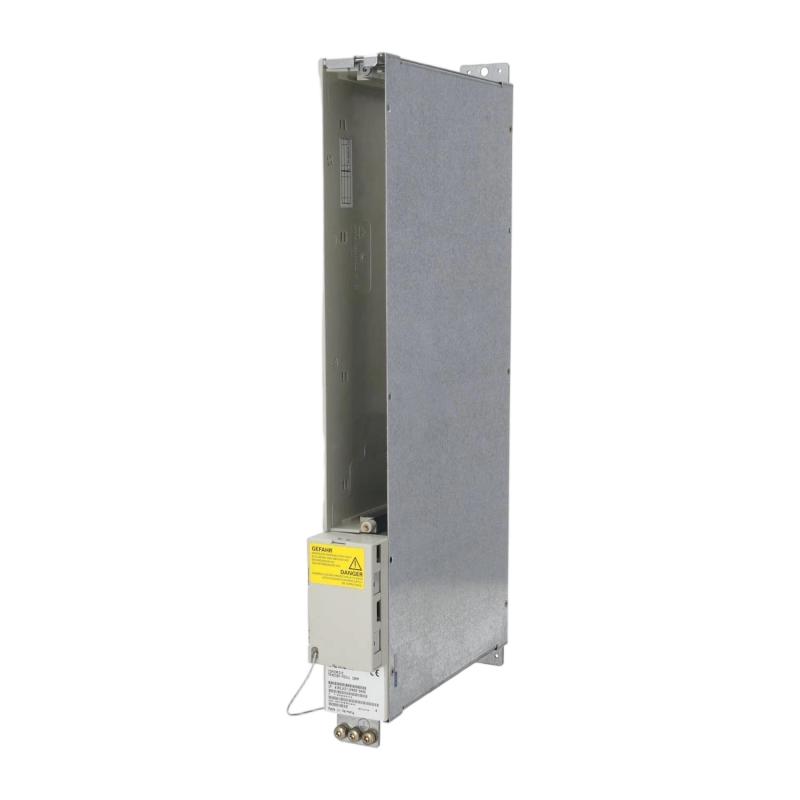
The Siemens 6SN1162-1AA00-0AA0 empty enclosure installation process should begin with mechanical compatibility checks, cabinet-layout verification, and confirmation of the intended SIMODRIVE system configuration. As an enclosure component rather than an independently operating control module, its installation focuses on correct mounting, adequate clearance, protection of adjacent equipment, and compliance with the drive system's mechanical arrangement.
Before commissioning the surrounding equipment, engineers should verify the complete part number and confirm that the enclosure is suitable for the intended location. Incorrect mechanical fit, obstructed ventilation, or interference with neighboring modules can complicate maintenance and compromise the installation's reliability.
Siemens 6SN1162-1AA00-0AA0 Enclosure Function and Application
An empty enclosure can serve as a mechanical housing or reserved installation space within an industrial drive assembly, depending on the specific system design. It should not be assumed to provide electrical control, power conversion, or communication functions unless these are explicitly specified for the installed configuration.
For the Siemens 6SN1162-1AA00-0AA0, the first engineering task is to establish its intended role in the machine's bill of materials and assembly drawings.
Typical considerations include:
Mechanical integration within a compatible drive cabinet.
Maintaining the intended arrangement of adjacent modules.
Preserving access for inspection and maintenance.
Preventing foreign objects from entering exposed spaces.
Maintaining required airflow and clearance around neighboring equipment.
An empty enclosure should not be treated as a substitute for a powered module or an electrical protective device.
Preparing the Siemens 6SN1162-1AA00-0AA0 for Installation
Before mounting the enclosure, review the mechanical drawings and confirm the available cabinet space. Inspect the mounting rails, fixing points, and surrounding modules for damage or deformation.
The following preparation checks are recommended:
Verify the complete order number against the approved parts list.
Confirm the enclosure's intended mounting position.
Check the dimensions and required clearances against the assembly drawing.
Inspect the enclosure for cracks, bent edges, and damaged fixing points.
Ensure that the mounting area is free from loose screws, metal fragments, and other debris.
Identify any adjacent components that must be removed temporarily to provide safe access.
If the enclosure is being installed during maintenance of a drive cabinet, isolate hazardous electrical supplies according to the equipment manufacturer's procedures before accessing the assembly.
Siemens 6SN1162-1AA00-0AA0 Mechanical Mounting Procedure
Mechanical installation should follow the approved SIMODRIVE assembly arrangement. Position the enclosure carefully and check that its mounting interfaces align with the designated fixing points.
Avoid forcing the enclosure into place when adjacent components appear misaligned. Resistance during mounting may indicate an incorrect position, a damaged fixing point, or a mismatch between the enclosure and the installed hardware.
During installation, verify that:
The enclosure sits correctly in its designated position.
Fixing points are aligned without excessive mechanical force.
Adjacent modules remain properly seated.
No wiring or other components are trapped behind the enclosure.
Required maintenance access and ventilation paths remain unobstructed.
Use only the fixing hardware and tightening requirements specified for the actual assembly. Do not assume a torque value when the applicable documentation does not provide one.
Siemens SIMODRIVE System Configuration and Commissioning Checks
Although an empty enclosure does not normally require independent electrical commissioning, its installation can affect the mechanical arrangement and serviceability of the surrounding drive system.
After mounting, inspect the assembly before restoring power.
Inspection item | Acceptance criterion |
|---|---|
Product identification | Part number matches the approved parts list |
Mounting position | Correct location confirmed against assembly drawings |
Mechanical fit | Enclosure sits securely without forced alignment |
Adjacent modules | No unintended displacement or interference |
Cable routing | No wiring trapped, pinched, or obstructed |
Ventilation | Required airflow paths remain clear |
Cabinet condition | No loose hardware or debris remains |
System readiness | Surrounding equipment is ready for its prescribed startup checks |
After inspection, restore the cabinet to its approved condition and follow the commissioning procedure for the complete drive system. Do not interpret successful startup as proof of mechanical compatibility if the enclosure has not been checked against the assembly documentation.
Field Installation Example: Siemens 6SN1162-1AA00-0AA0
Consider a representative maintenance situation in which an empty enclosure is replaced during servicing of a SIMODRIVE cabinet.
The replacement appears to fit, but the mounting edge does not align cleanly with the neighboring assembly. Rather than tightening the fasteners to pull the parts together, the technician stops and checks the part number, mounting position, and surrounding module arrangement.
The inspection reveals that the enclosure has been positioned incorrectly. Correcting the alignment before tightening prevents unnecessary mechanical stress and avoids disturbing adjacent equipment.
This is an illustrative installation scenario, not a verified service record for this specific Siemens model.
Long-Tail Keywords for Siemens 6SN1162-1AA00-0AA0
Siemens 6SN1162-1AA00-0AA0 installation guide
Siemens 6SN1162-1AA00-0AA0 empty enclosure mounting
SIMODRIVE empty enclosure installation procedure
Siemens drive cabinet mechanical installation
Siemens enclosure replacement and inspection
SIMODRIVE system configuration and maintenance