Siemens 6SN1162-1AA00-0AA0 Empty Enclosure Troubleshooting Guide (Mechanical Fault Diagnosis)
Siemens 6SN1162-1AA00-0AA0 Enclosure Troubleshooting: Mounting Misalignment
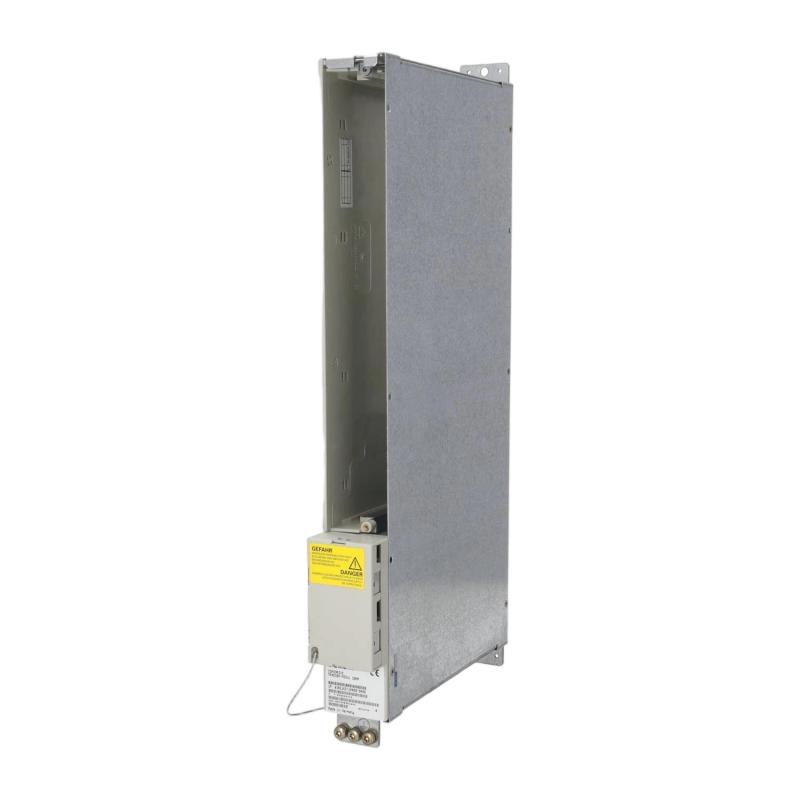
Siemens 6SN1162-1AA00-0AA0 empty enclosure troubleshooting should begin with part identification, mounting alignment, and inspection of the surrounding drive assembly. If the enclosure does not fit correctly, its mounting hardware cannot be secured normally, or adjacent modules appear displaced, engineers should investigate the mechanical installation before modifying the cabinet.
Because an empty enclosure is primarily a mechanical component, its fault diagnosis differs from troubleshooting a PLC, drive controller, or communication module. The main objective is to identify mechanical interference, incorrect positioning, damage, or a mismatch with the approved assembly configuration.
Siemens 6SN1162-1AA00-0AA0 Mechanical Fault Symptoms
Problems associated with enclosure installation may include:
Mounting holes that do not align with the designated fixing points.
A visible gap between the enclosure and neighboring components.
Fasteners that cannot be installed without applying excessive force.
Interference with adjacent modules or cabinet covers.
Restricted access to wiring or maintenance points.
Deformation or damage discovered during removal.
These symptoms do not automatically mean the enclosure itself is defective. An incorrect mounting position, incompatible replacement component, or displaced neighboring module can produce similar conditions.
The first task is to document the observed condition and compare it with the machine's assembly drawings.
Siemens Empty Enclosure Fault Diagnosis: Identify the Mechanical Cause
A systematic investigation should distinguish among three possibilities.
Incorrect component identification: Verify the complete 6SN1162-1AA00-0AA0 designation against the approved spare-parts record. Similar-looking enclosure components may have different mechanical interfaces or intended positions.
Installation misalignment: Inspect the mounting rails, fixing points, and adjacent modules. Check whether the enclosure was inserted at the correct position and orientation.
Physical damage: Examine the enclosure's edges, fixing points, and housing surfaces for deformation, cracks, or other visible defects.
Do not use fastener force to compensate for misalignment. Mechanical stress can damage mounting interfaces or displace adjacent components, making subsequent maintenance more difficult.
Case Analysis: Siemens 6SN1162-1AA00-0AA0 Enclosure Does Not Fit
Consider a representative repair situation in which a replacement enclosure cannot be secured in its intended cabinet position.
The technician initially suspects a manufacturing defect because one fixing point appears offset. Instead of drilling a new hole or bending the enclosure, the technician compares the installed part with the machine's parts list and assembly drawing.
The inspection then focuses on the enclosure orientation and the mounting position of the adjacent assembly. If incorrect positioning is identified, the technician restores the specified arrangement and repeats the fit check.
If the fixing points still fail to align, the next action is to verify the component identity and inspect for mechanical damage rather than modifying the enclosure.
This example illustrates a practical Fault Diagnosis method and is not a documented failure report for the specific model.
Siemens 6SN1162-1AA00-0AA0 Inspection and Repair Decisions
The appropriate corrective action depends on the evidence obtained during inspection.
Finding | Possible cause | Recommended response |
|---|---|---|
Fixing points do not align | Incorrect position or component mismatch | Recheck the assembly drawing and part number |
Enclosure sits unevenly | Mounting interference or displaced adjacent hardware | Inspect the surrounding assembly |
Housing edge is bent | Mechanical damage | Assess and replace the damaged component as required |
Fasteners require excessive force | Misalignment or incorrect hardware | Stop installation and verify the fixing arrangement |
Enclosure obstructs access | Incorrect positioning or configuration | Restore the approved cabinet layout |
Enclosure fits correctly but another fault persists | Separate system problem | Investigate the affected equipment independently |
Do not drill, cut, bend, or otherwise modify the enclosure unless an approved engineering procedure explicitly permits the change.
Siemens 6SN1162-1AA00-0AA0 System Configuration and Safety Checks
A mechanical enclosure fault can affect more than the enclosure itself. If the housing displaces neighboring components, it may interfere with wiring, protective covers, ventilation, or access to service points.
Before completing the repair, verify that the surrounding drive assembly remains in its documented arrangement. Check for trapped cables, loose hardware, obstructed cooling paths, and damaged mounting surfaces.
If the enclosure is part of an electrical cabinet, perform inspection and maintenance under the applicable isolation procedure. An empty enclosure should not be assumed to provide electrical isolation, touch protection, or any other safety function unless that function is explicitly documented.
Siemens 6SN1162-1AA00-0AA0 Troubleshooting: When Replacement Is Necessary
Replacement is appropriate when the enclosure has confirmed mechanical damage, cannot be mounted according to the approved design, or is identified as the wrong component for the application.
Before installing a replacement, compare its order number and physical interfaces with the approved parts list. Once fitted, repeat the mechanical inspection and verify that adjacent modules, cables, covers, and airflow paths remain unobstructed.
If the enclosure is correctly installed but the machine continues to report an electrical or communication alarm, investigate that alarm separately. An empty enclosure should not be blamed for a control-system fault without evidence of a direct mechanical or installation-related connection.
Siemens 6SN1162-1AA00-0AA0 Post-Repair Verification
After completing the repair, document the identified cause, the corrective action, and the final inspection results.
Confirm that the enclosure is secure, the mounting interfaces are correctly aligned, and no neighboring components have been disturbed. Verify that cabinet covers and protective components are restored to their approved condition before the surrounding equipment is returned to service.
The most effective Siemens 6SN1162-1AA00-0AA0 troubleshooting process relies on accurate part identification, careful mechanical inspection, and adherence to the original assembly design. This avoids unnecessary modifications and helps preserve the serviceability of the complete drive system.