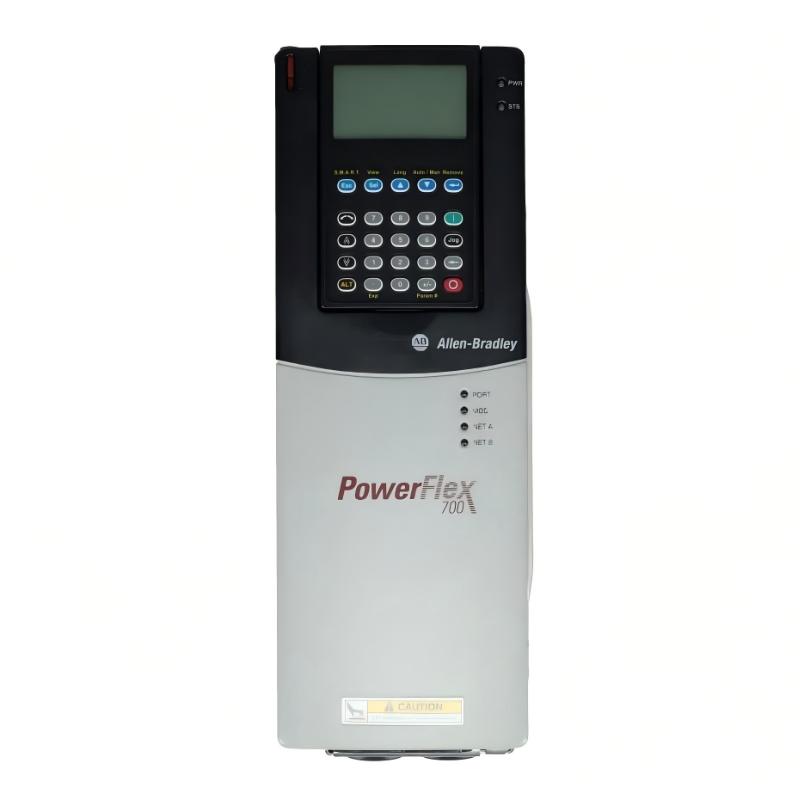
Allen Bradley 20BD5P0A3AYNAEC1 PowerFlex 700 AC Drive Troubleshooting Guide: Fault Diagnosis and Repair
Allen Bradley 20BD5P0A3AYNAEC1 troubleshooting should begin with fault behavior analysis rather than immediate drive replacement. PowerFlex 700 failures are often caused by motor conditions, parameter settings, electrical supply problems, or application issues.
Allen Bradley 20BD5P0A3AYNAEC1 PowerFlex 700 Fault Symptoms
Common fault symptoms include:
- Overcurrent alarm
- Overvoltage trip
- Undervoltage fault
- Motor acceleration failure
- Drive overheating
- Communication loss
- Unexpected shutdown
- Frequent restart faults
The first diagnostic question should be:
Did the drive fail because of an internal hardware problem, or did the application condition trigger protection?
This distinction prevents unnecessary replacement.
Allen Bradley 20BD5P0A3AYNAEC1 Fault Diagnosis Process
A practical troubleshooting path is:
Power Supply → Drive Input → Drive Parameters → Motor → Mechanical Load → Control System
Start by reviewing:
- Fault history
- Operating current
- DC bus condition
- Motor response
- Parameter settings
- External control signals
The fault code provides useful information, but the engineer must also examine the conditions that existed when the fault occurred.
Allen Bradley 20BD5P0A3AYNAEC1 Overcurrent Troubleshooting
An overcurrent fault is one of the most common PowerFlex 700 problems.
Possible causes include:
- Shorted motor cable
- Incorrect motor parameters
- Mechanical overload
- Rapid acceleration
- Motor insulation problems
- Incorrect drive sizing
A practical diagnostic method:
- Disconnect the mechanical load if possible.
- Verify motor current.
- Compare motor data with drive parameters.
- Check acceleration settings.
- Inspect motor cables.
For example, if motor current rises from a normal 8 A operating level to 25 A immediately after startup, the engineer should investigate acceleration and load conditions before replacing the drive.
Allen Bradley 20BD5P0A3AYNAEC1 Communication Fault Diagnosis
Communication problems may appear as drive failure when the actual issue exists in the control network.
Check:
- Communication module status
- Network addressing
- Cable condition
- PLC configuration
- Data exchange status
A communication fault does not necessarily indicate a damaged PowerFlex 700 controller.
The diagnostic approach should separate:
Drive Hardware → Communication Interface → Network → PLC Program
Allen Bradley 20BD5P0A3AYNAEC1 Overheating Fault Troubleshooting
Temperature-related faults require inspection of the physical installation.
Check:
- Cabinet airflow
- Cooling fan operation
- Ambient temperature
- Dust accumulation
- Load condition
- Switching frequency settings
A drive operating near maximum load in a poorly ventilated cabinet may overheat even though the drive itself is functioning normally.
Allen Bradley 20BD5P0A3AYNAEC1 Real Fault Diagnosis Case
During a maintenance investigation, a PowerFlex 700 drive repeatedly stopped after approximately 40 minutes of operation.
The fault history indicated an overheating condition.
The engineer measured:
- Cabinet temperature: 46 °C
- Drive air inlet temperature: higher than expected
- Cooling fan condition: restricted airflow
The drive was removed and inspected, revealing dust accumulation blocking ventilation paths.
After cleaning the cabinet and restoring airflow, the operating temperature decreased and the drive continued running without faults.
The failure was caused by environmental conditions rather than internal drive damage.
Allen Bradley 20BD5P0A3AYNAEC1 Parameter Fault Diagnosis
Incorrect parameters can create symptoms similar to hardware failure.
Review:
- Motor rated current
- Motor voltage
- Frequency settings
- Acceleration time
- Deceleration time
- Control source
- Speed reference
A parameter mismatch can cause:
- Excessive current
- Poor speed regulation
- Motor vibration
- Frequent protection trips
Always compare the programmed values with the actual motor nameplate.
Allen Bradley 20BD5P0A3AYNAEC1 Repair Decision
Before replacing the PowerFlex 700 AC Drive, confirm:
- Incoming voltage stability
- Motor insulation condition
- Motor cable integrity
- Mechanical load condition
- Parameter correctness
- Cooling condition
- Communication wiring
Replace the drive only when external causes have been eliminated and internal failure is strongly indicated.
Allen Bradley 20BD5P0A3AYNAEC1 Post-Repair Validation
After repair or replacement, perform a complete commissioning check.
Verify:
- Correct parameter download
- Motor rotation direction
- Acceleration performance
- Running current
- Temperature stability
- Communication reliability
- Fault history
A repaired drive should be tested under normal operating conditions, not only during no-load operation.
Allen Bradley 20BD5P0A3AYNAEC1 Troubleshooting Checklist
| Fault Condition | Diagnostic Priority |
|---|---|
| Overcurrent | Motor load and parameters |
| Overvoltage | Deceleration and power condition |
| Overheating | Cooling and cabinet environment |
| Communication failure | Network and configuration |
| Random trips | Fault history and external causes |
| Repeated failure after replacement | System-level problem |