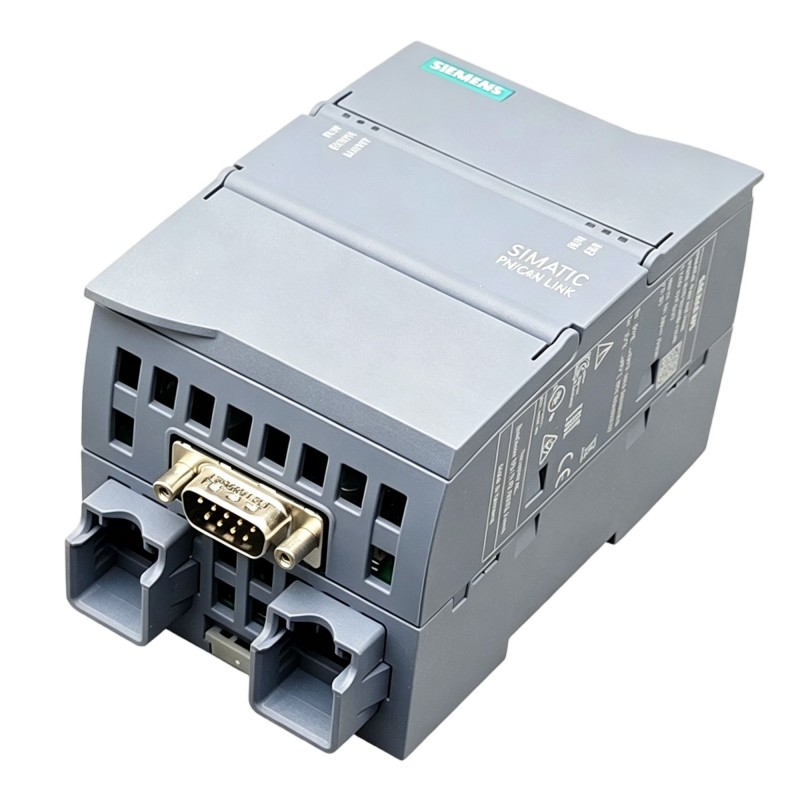
Siemens 6AG1620-0AA00-7AA0 Communication Module Installation Guide (Hardware Setup & Commissioning)
Introduction
The Siemens 6AG1620-0AA00-7AA0 Communication Module should be installed and commissioned only after its intended function, hardware compatibility, and system requirements have been confirmed. In industrial automation applications, communication-related hardware must be integrated carefully to avoid configuration mismatches, unreliable data exchange, or unexpected controller behavior. This installation guide outlines a practical workflow for receiving inspection, hardware preparation, system configuration, and commissioning.
Because the exact interface and supported communication functions must be verified for this specific order number, do not assume that the module supports a particular protocol or connection type without checking its product documentation.
Siemens 6AG1620-0AA00-7AA0 Communication Module: Pre-Installation Checks
Before starting the installation, compare the module’s complete order number with the bill of materials and the approved system design. A similar-looking Siemens module may have a different interface, firmware requirement, or compatibility range.
Check the following items:
Order number: Confirm that the label reads 6AG1620-0AA00-7AA0.
Physical condition: Inspect the housing, connectors, contacts, and mounting features for shipping damage.
System compatibility: Verify the supported rack, controller, base unit, or mounting arrangement specified for the module.
Configuration requirements: Confirm whether the engineering project requires a hardware catalog entry, device description, firmware update, or additional configuration.
Environmental conditions: Check the specified operating temperature, electrical environment, and installation clearances.
Record the existing system configuration before replacing or adding hardware. This provides a reliable reference if the installation introduces a new fault.
Hardware Installation and Electrical Preparation
Isolate the relevant equipment and follow the plant’s lockout/tagout procedures before handling the module. Never insert, remove, or reconnect industrial control hardware while energized unless the manufacturer's documentation explicitly permits that operation.
Installation procedure
Switch off the applicable power supply and verify that the work area is safe.
Identify the intended mounting position using the approved electrical drawings and hardware layout.
Check that the mounting interface and any required backplane or connector are clean and undamaged.
Install the module according to the specified mechanical arrangement. Do not force the module into a slot or connector.
Secure the module using the prescribed locking or fastening method.
Connect only the cables and interfaces confirmed for the intended application.
Inspect cable routing, connector seating, shielding, and strain relief before restoring power.
Keep communication wiring separated from high-current switching cables where practical. For installations exposed to electrical noise, follow the grounding and shielding requirements specified for the actual interface.
Siemens 6AG1620-0AA00-7AA0 System Configuration
Correct physical installation does not guarantee that a communication module will be recognized by the automation system. The engineering configuration must match the installed hardware.
Open the project in the appropriate Siemens engineering environment and verify that the selected catalog entry corresponds to the complete order number. Confirm the permitted hardware arrangement and any documented firmware or software dependencies.
If the project includes network parameters, device names, node addresses, or communication connections, enter only the values required by the verified interface. Avoid assigning an IP address or configuring a protocol merely because those settings are common on other Siemens communication modules.
Before downloading changes, compare the offline project with the running system. Confirm that the change will not overwrite unrelated controller parameters or interrupt production unexpectedly.
Commissioning and Functional Verification
Commissioning should progress from basic hardware recognition to end-to-end communication testing.
Test stage | What to verify | Expected result |
|---|---|---|
Initial power-up | Power supply and module status indicators | Status matches the documented operating condition |
Hardware recognition | Module appears in the engineering diagnostics | Correct module identity and no unexplained hardware fault |
Configuration check | Project configuration matches installed hardware | No unresolved configuration mismatch |
Interface verification | Approved cable, connector, or bus connection | Stable physical connection |
Communication test | Exchange the intended test data or perform the approved diagnostic test | Data transfer or interface function operates as designed |
Stability test | Monitor diagnostics during normal operating conditions | No recurring faults or unexpected interruptions |
If the module is part of a running production system, conduct functional testing within an approved commissioning window. Verify that dependent controllers, operator interfaces, and other connected equipment behave as expected before returning the system to normal operation.
Field Case: Module Not Recognized After Installation
A common commissioning scenario occurs when a newly installed module does not appear correctly in the engineering diagnostics.
The engineer first confirms the complete order number and checks whether the selected project entry matches the installed hardware. The mounting position and connector seating are then inspected with the equipment safely isolated. After power is restored, the engineer reviews the diagnostic buffer and compares the reported hardware information with the approved configuration.
If the module remains unrecognized, the next steps are to verify documented compatibility, firmware requirements, and any required project changes. Repeatedly downloading the same configuration without identifying the mismatch is unlikely to resolve the problem and can introduce unnecessary changes to the running system.
Installation Checklist
Before handover, confirm that:
The installed module matches the approved order number.
Mechanical installation and connector engagement have been checked.
Power and grounding arrangements comply with the system design.
The engineering project matches the installed hardware.
Required configuration parameters have been verified.
Diagnostics show no unresolved installation-related fault.
The intended communication or interface function has been tested.
The final configuration and commissioning results have been recorded.
A documented installation baseline makes future replacement, maintenance, and fault diagnosis more efficient.