Siemens 6SN1145-1BB00-0EA0 Troubleshooting Guide: Infeed and Regenerative Feedback Fault Diagnosis
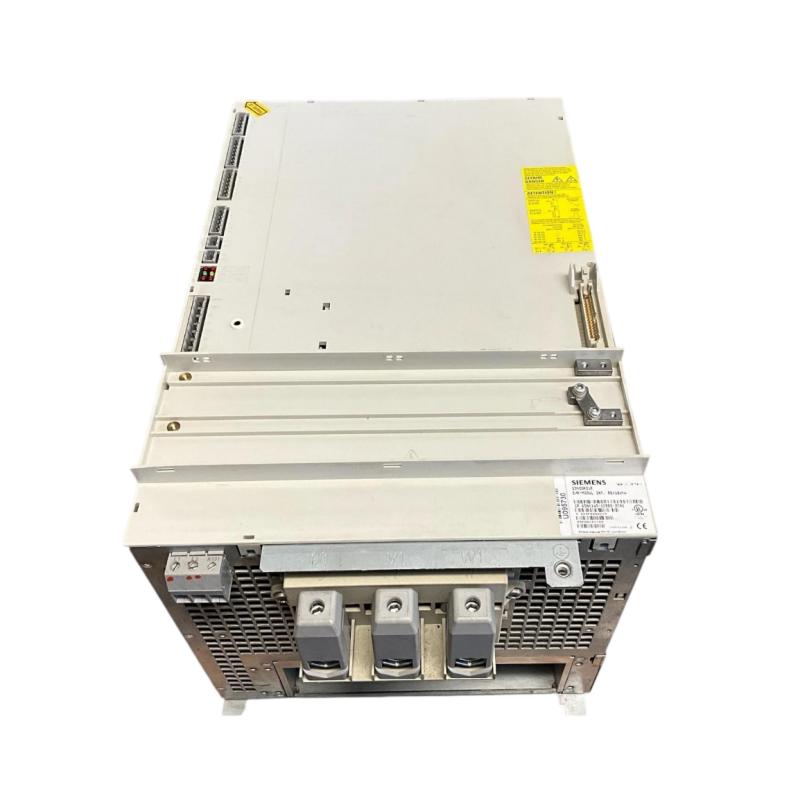
The Siemens 6SN1145-1BB00-0EA0 infeed/regenerative feedback module is used in SIMODRIVE 611 drive systems to support power conversion and regenerative operation. When the system develops an infeed fault, fails to enable connected drives, or trips during deceleration, engineers should investigate the supply, associated line-side components, operating configuration, and connected drive loads before concluding that the module has failed.
A useful troubleshooting process combines fault-history analysis, electrical inspection, and controlled testing. The exact diagnostic messages and test limits depend on the installed hardware and system configuration.
1. Identify the Fault Pattern Before Testing
Start by recording the diagnostic message, when the fault occurs, and what the machine was doing immediately beforehand. This information helps distinguish a startup problem from a fault related to load changes or regenerative operation.
Establish whether the fault occurs:
Immediately after power-up.
When the connected drives receive an enable command.
During acceleration or increased load.
During deceleration or regenerative braking.
After sustained operation.
Across several connected drives or on one specific axis.
Record the original diagnostic information before resetting the system. Repeated resets without investigation can obscure the sequence of events and may expose the equipment to additional stress.
2. Diagnose Supply and Infeed Problems
If the infeed module does not reach its expected operating state, begin with the incoming supply and associated protection circuits.
With the equipment isolated, inspect accessible wiring, connectors, protective devices, and signs of thermal damage. If measurements are necessary, use the approved test points and compare readings with the specifications for the exact system.
Symptom | Possible area of concern | Diagnostic approach |
|---|---|---|
Infeed does not become ready | Supply condition or startup prerequisites | Review supply status and diagnostic history |
Protective device trips during startup | Electrical fault or supply-side problem | Isolate the system and investigate the affected circuit |
Fault appears intermittently | Loose connection or unstable supply condition | Inspect connections and correlate faults with operating events |
Several connected drives become unavailable | Shared infeed or system-level condition | Examine common supply and infeed diagnostics |
Do not assume that an apparently normal supply reading proves the complete power circuit is healthy. The diagnostic sequence and approved measurement procedure should guide further testing.
3. Investigate Regenerative Feedback Faults
A fault that appears mainly during deceleration may involve regenerative operation rather than a general startup problem.
During braking, connected drives may return energy to the drive system. The infeed and regenerative feedback arrangement must be compatible with the machine's operating conditions and the installed line-side components.
Investigate the following areas:
Whether the fault coincides with a specific deceleration or braking sequence.
Whether the fault occurs on one axis or across multiple connected drives.
Whether the connected drive configuration matches the original design.
Whether the required line-side components are installed and correctly rated.
Whether any documented configuration settings have been changed.
Whether the fault began after a motor, drive, or module replacement.
Avoid changing operating settings simply to suppress a regenerative fault. Incorrect settings can affect system behavior and may create additional electrical or operational risks.
4. Check Associated Line Reactors, Filters, and Connections
The infeed module should be evaluated as part of the complete drive system. Associated line-side components can affect operation, and an error in component selection or connection may produce symptoms that appear to originate in the module.
After isolating the equipment and verifying that hazardous voltage is absent:
Compare the installed components with the approved system drawings.
Confirm their identification and ratings.
Inspect accessible connections for looseness, discoloration, or heat damage.
Check cables and terminals for insulation damage or contamination.
Review maintenance records for recent component substitutions or wiring changes.
If a component has been replaced, confirm that its exact specification is appropriate for the 80/104 kW-class system. Similar-looking parts are not necessarily interchangeable.
5. Diagnose Faults That Occur Only Under High Load
When the system operates normally at light load but trips during demanding production cycles, investigate the relationship between load, operating sequence, and fault timing.
A practical diagnostic sequence is:
Record the operating condition at the moment of failure.
Compare the diagnostic history across the infeed module and connected drives.
Check whether one axis or the entire drive group is affected.
Inspect the driven mechanism for excessive resistance or abnormal load.
Review relevant motor and drive configuration records.
Compare measured conditions with the documented operating limits.
If several axes fault at the same time, a shared supply or infeed-related issue deserves attention. If only one axis is affected, investigate that axis's motor circuit, mechanical load, and configuration as well.
Do not increase protective limits without establishing the root cause and confirming that any proposed change is explicitly permitted by the equipment design.
6. Field Case: Regenerative Fault During Repeated Deceleration
A machining line operates normally during steady motion but experiences a drive-system trip during repeated rapid deceleration. The maintenance team suspects the infeed/regenerative feedback module because the fault occurs when the machine brakes.
The engineer first compares the fault timestamps with the machine sequence. The team then reviews the infeed diagnostics and inspects the associated line-side components under the required isolation procedure.
The investigation identifies a mismatch between the installed line-side arrangement and the documented configuration. The team verifies the correct component combination and makes the required correction according to the system documentation.
After the repair, the machine is tested through a controlled operating cycle that includes the previously problematic deceleration sequence. The original fault does not recur during the verification test.
Diagnostic takeaway: Faults during deceleration should be investigated in the context of regenerative operation and the complete infeed arrangement. Replacing the module without checking associated components may leave the original problem unresolved.
7. Determine Whether the Module Requires Replacement
The Siemens 6SN1145-1BB00-0EA0 should not be declared defective solely because the drive system reports an infeed-related fault. First establish whether the supply, connections, associated components, and configuration are correct.
Replacement or specialist repair becomes a stronger consideration when:
The fault remains after documented external causes have been investigated.
There is visible damage to the module or its power connections.
Qualified testing identifies a module-side defect.
The fault follows the module through an approved diagnostic process that rules out other causes.
Before installing a replacement, verify the complete part number and compatibility with the existing system. Since the 0EA0 version has been discontinued and a successor variant exists, confirm any required replacement and configuration procedures rather than assuming automatic interchangeability.
Internal power-electronic repair should be performed only by qualified specialists using appropriate procedures and equipment.
8. Post-Repair Functional Verification
After corrective action, test the system under controlled conditions before restoring normal production.
Verification step | Expected outcome |
|---|---|
Initial startup | Infeed follows the documented startup sequence |
Diagnostic review | No unresolved fault associated with the original problem |
Drive enable | Connected drives reach the expected state |
Normal motion test | Machine responds correctly within approved limits |
Deceleration test | Regenerative operating sequence completes as expected |
Final inspection | No abnormal heating, odor, or visible damage |
Maintenance report | Fault cause, corrective action, and test results recorded |
If the original fault returns, compare the new diagnostic record with the initial event. The difference may reveal whether the remaining issue is supply-related, load-dependent, configuration-related, or internal to the module.
9. Preventive Maintenance for SIMODRIVE 611 Infeed Systems
Preventive maintenance should cover the infeed module and the associated electrical installation rather than focusing on the module alone.
Keep cabinet cooling paths and filters clean.
Inspect accessible power connections during scheduled, safely isolated maintenance.
Monitor recurring infeed and regenerative-operation faults.
Check associated line-side components against the approved configuration.
Record fault timing and machine operating conditions.
Maintain accurate spare-parts and replacement records.
A disciplined fault-diagnosis process reduces unnecessary module replacement, helps identify problems elsewhere in the drive system, and supports more reliable operation of Siemens SIMODRIVE 611 equipment.