Siemens 6SN1161-1CA00-0CA1 Drive Bus Cable Troubleshooting Guide (Fault Diagnosis)
Siemens 6SN1161-1CA00-0CA1 Drive Bus Cable Fault Diagnosis
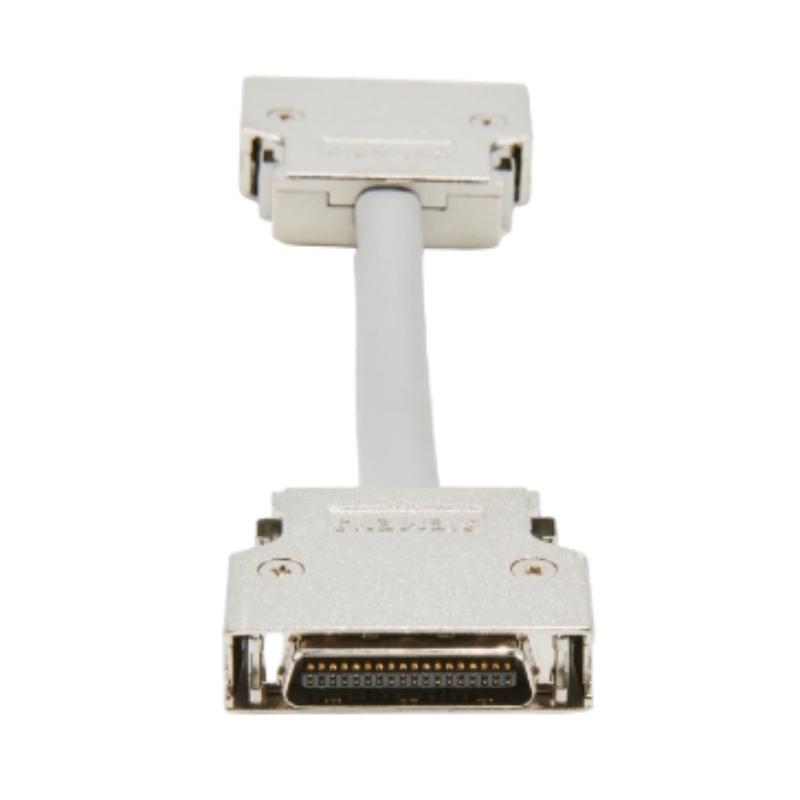
Siemens 6SN1161-1CA00-0CA1 drive bus cable troubleshooting should begin with cable identification, connector integrity, and module configuration before a SIMODRIVE 611-D drive component is declared defective. An incorrectly seated connection, damaged cable, or unsuitable replacement may contribute to communication problems, although similar symptoms can also result from faults in the drive modules or control system.
Effective Fault Diagnosis depends on comparing the alarm history with physical inspection results and the machine's actual System Configuration. Replacing components without this evidence can increase downtime without resolving the original fault.
Recognizing Siemens 6SN1161-1CA00-0CA1 Communication Fault Symptoms
Drive-bus problems may appear as communication alarms, unavailable drive components, axes that cannot enter their expected operating state, or intermittent faults following cabinet maintenance.
The timing and distribution of the fault provide useful diagnostic clues.
If the alarm begins immediately after cable replacement, verify the replacement part and connector arrangement first. If multiple drive components become unavailable simultaneously, investigate shared connections and configuration issues before focusing on a single module. If the fault existed before maintenance, do not assume that the cable is responsible merely because it is accessible.
Before making changes, record:
The exact alarm text and diagnostic code.
The affected drive components and axes.
Whether the fault is continuous or intermittent.
Recent maintenance or cable replacement activity.
The status of other components in the drive system.
This information establishes a baseline for systematic troubleshooting.
Siemens SIMODRIVE 611-D Troubleshooting: Narrowing Down the Cause
A practical diagnostic process begins by checking the most directly verifiable causes.
Cable compatibility: Verify that the installed cable is the specified round-cable variant and that its order number matches the approved parts list. A cable that looks similar may belong to a different configuration.
Connector integrity: Under safe electrical isolation, inspect the connectors for incomplete engagement, damaged contacts, contamination, or mechanical stress.
Installation condition: Check for cable pinching, abrasion, excessive bending, or interference with cabinet covers and adjacent equipment.
Drive diagnostics: If no installation defect is identified, review the available control-unit and drive-module diagnostic information. Determine whether the fault is limited to one connection or affects a wider portion of the drive system.
This approach helps distinguish a cable-related problem from a controller, module, or configuration fault.
Case Analysis: Siemens 6SN1161-1CA00-0CA1 Fault After Cabinet Maintenance
Consider a representative scenario in which a machine develops a communication alarm immediately after scheduled cabinet servicing.
The engineer reviews the maintenance history and confirms that the drive-bus cable was disconnected during the work. Instead of replacing the drive controller immediately, the engineer verifies the cable order number, checks the connector engagement, and compares the installed connections with the machine documentation.
Suppose the inspection reveals that one connector was not fully engaged. The connection is corrected under the approved isolation procedure, and the system is restarted safely. The engineer then checks whether the original alarm returns and whether the affected drive component is recognized correctly.
If the alarm clears and the functional test passes, the findings support an installation-related cause. If the alarm remains, additional diagnostics are required.
This is an illustrative troubleshooting case, not a documented repair event for a particular installation.
Siemens 6SN1161-1CA00-0CA1 Cable Damage and Repair Decisions
Not every drive-bus fault requires cable replacement. The decision should be based on observable defects and diagnostic evidence.
Inspection finding | Possible interpretation | Recommended action |
|---|---|---|
Connector not fully seated | Connection problem | Reconnect according to the approved procedure |
Damaged cable insulation | Mechanical damage | Replace with a compatible assembly |
Deformed connector housing | Secure engagement may be compromised | Replace or assess according to the approved service procedure |
Incorrect cable designation | Configuration mismatch | Verify the required part number |
No visible cable defect | Root cause remains unconfirmed | Continue drive-system diagnostics |
Fault persists after verified replacement | Another component or configuration issue may exist | Review control and drive diagnostic information |
Avoid improvised splices or unapproved connector repairs. A repair that restores physical continuity does not necessarily restore reliable communication performance.
Siemens 6SN1161-1CA00-0CA1 Signal Analysis and Diagnostic Limits
A drive-bus cable fault cannot reliably be diagnosed using an arbitrary voltage, resistance, or signal threshold. Appropriate testing depends on the interface design and the procedures specified for the connected equipment.
For example, a continuity test, where permitted, may identify an open conductor but cannot independently establish that the complete communication path operates correctly under normal conditions. Likewise, an ordinary multimeter reading may not reveal a digital communication problem.
Use available control-system status information and alarm history to determine when the fault occurs. Perform electrical tests only when they are permitted by the relevant technical documentation and when the required isolation and safety measures are in place.
Never disconnect a live drive-bus cable as a shortcut for fault diagnosis.
Siemens 6SN1161-1CA00-0CA1 Recovery and Post-Repair Verification
After correcting the identified issue, repeat the checks that originally failed. Confirm that the expected drive components are recognized, that the communication alarm no longer recurs, and that the affected axis completes the machine manufacturer's prescribed functional test.
For intermittent problems, observe the equipment under controlled operating conditions and review the diagnostic history instead of relying on a single successful restart.
Document the identified cause, corrective action, replacement part number, and test results. A clear maintenance record helps engineers recognize recurring connection problems and distinguish them from unrelated drive-module failures.
When Siemens 6SN1161-1CA00-0CA1 Troubleshooting Must Go Beyond the Cable
If the cable designation is correct, the connectors are secure, and the fault remains, expand the investigation to the connected drive modules, control unit, and System Configuration.
Compare the installed hardware with the approved machine documentation. Review the exact diagnostic messages and establish whether the fault affects a single connection or several drive components.
Do not replace a controller solely because a communication alarm remains active. A reliable repair decision requires evidence that identifies the likely failure point.
For Siemens 6SN1161-1CA00-0CA1 drive bus cable Fault Diagnosis, systematic inspection, documented testing, and controlled commissioning provide a more dependable path to recovery than repeated component substitution.