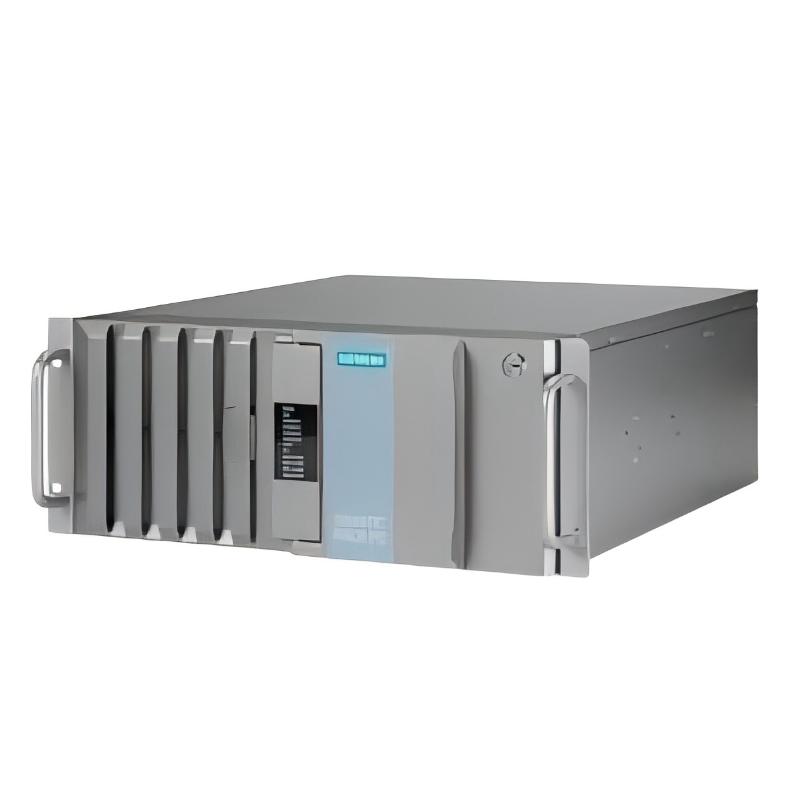
Siemens 6AG4114-3JA12-0XX2 Rack-Mount Industrial PC Troubleshooting Guide (Fault Diagnosis & Repair)
Siemens 6AG4114-3JA12-0XX2 Industrial PC Troubleshooting Guide for Startup and Communication Faults
Siemens 6AG4114-3JA12-0XX2 Rack-Mount Industrial PC faults are commonly caused by power instability, operating system errors, communication configuration problems, or environmental conditions. Effective troubleshooting requires analyzing symptoms first instead of replacing hardware immediately.
In industrial automation environments, an IPC failure can stop visualization systems, production databases, or machine monitoring functions. Engineers must identify whether the problem comes from the Industrial PC itself, connected equipment, or the surrounding automation network.
This Fault Diagnosis guide describes practical troubleshooting methods for Siemens 6AG4114-3JA12-0XX2 failures based on field engineering experience.
Siemens 6AG4114-3JA12-0XX2 Industrial PC Startup Failure Symptoms and Analysis
One common Siemens 6AG4114-3JA12-0XX2 troubleshooting situation is a startup failure.
Typical symptoms include:
- No display output
- System restart loop
- Operating system fails to load
- Long boot time
- Unexpected shutdown
The first diagnostic step is identifying whether the failure occurs before or after the operating system starts.
Engineering judgment process:
Power LED abnormal → check power input
BIOS screen unavailable → check hardware layer
Operating system error → check storage/software layer
Application cannot start → check configuration layer
This layered analysis avoids unnecessary replacement of expensive industrial components.
Siemens 6AG4114-3JA12-0XX2 Power Supply Fault Diagnosis and Recovery Case
A real field case involved a Siemens 6AG4114-3JA12-0XX2 Industrial PC that repeatedly restarted during machine operation.
Initial observation:
- Startup completed normally
- Restart occurred after 20–30 minutes
- No obvious hardware alarm appeared
The engineering team measured the supply voltage during operation.
Recorded data:
- Normal condition: 230 VAC
- During restart event: voltage dropped to 187 VAC
Further inspection showed that the IPC shared a power line with several high-current devices.
The corrective action included:
- Separating the IPC power circuit
- Adding improved power protection
- Checking grounding continuity
After correction, the IPC operated continuously for several days without restart.
The root cause was not the industrial computer hardware but unstable electrical supply.
Siemens 6AG4114-3JA12-0XX2 Network Communication Fault Troubleshooting
Industrial automation systems depend heavily on reliable communication. A Siemens 6AG4114-3JA12-0XX2 communication fault may appear as:
- PLC connection loss
- SCADA data interruption
- Slow remote access
- Missing production data
A practical Fault Diagnosis process starts with network analysis.
Engineers normally check:
- Physical Ethernet connection
- IP address configuration
- Network gateway settings
- PLC communication status
- Software communication drivers
Example diagnostic logic:
Link Status = ON?
        |
        YES
        ↓
IP Configuration Correct?
        |
        YES
        ↓
PLC Response Available?
        |
        YES
        ↓
Application Communication Test
In one factory case, communication failures occurred randomly every few hours. Network monitoring showed packet loss above 8%. After replacing a damaged Ethernet cable near a moving machine section, packet loss dropped below 0.1%.
The Siemens 6AG4114-3JA12-0XX2 IPC itself was operating correctly.
Siemens 6AG4114-3JA12-0XX2 Storage and Operating System Fault Diagnosis
Another common troubleshooting area is storage-related failure.
Symptoms may include:
- Slow application loading
- System freezing
- Boot errors
- Unexpected application termination
Diagnostic checks include:
- Storage health monitoring
- Available disk capacity
- Operating system event logs
- Application startup records
A typical failure pattern occurs when the system disk becomes overloaded by industrial data logging.
For example:
Before maintenance:
- Disk usage: 98%
- Application startup time: 180 seconds
After data management optimization:
- Disk usage: 65%
- Startup time: 45 seconds
The improvement was achieved without replacing the Industrial PC.
This demonstrates why engineers should complete system-level analysis during Siemens 6AG4114-3JA12-0XX2 repair.
Siemens 6AG4114-3JA12-0XX2 Thermal Fault Troubleshooting in Industrial Cabinets
Temperature-related problems are often overlooked during IPC troubleshooting.
Possible symptoms:
- Random shutdown
- Reduced performance
- Fan alarm
- System instability after long operation
Field engineers usually check:
- Internal temperature values
- Cabinet airflow
- Fan condition
- Dust accumulation
In one application, the IPC temperature reached 58°C after eight hours of operation. Inspection found blocked ventilation filters.
After cleaning the cabinet airflow path:
- Operating temperature decreased from 58°C to 36°C
- System stability returned
- No further shutdown occurred
The failure was caused by environmental conditions rather than electronic damage.
Siemens 6AG4114-3JA12-0XX2 Fault Recovery Strategy and Maintenance Practice
Successful Siemens 6AG4114-3JA12-0XX2 repair depends on correct fault classification.
Recommended troubleshooting sequence:
Hardware Layer
Check:
- Power supply
- Cooling system
- Connections
- Physical damage
Communication Layer
Check:
- Network configuration
- PLC connection
- Protocol status
Software Layer
Check:
- Operating system
- Application configuration
- Storage condition
Environment Layer
Check:
- Temperature
- Electrical interference
- Cabinet condition
This approach reduces unnecessary downtime and prevents replacing functional components.
Siemens 6AG4114-3JA12-0XX2 Industrial PC Troubleshooting Conclusion
The Siemens 6AG4114-3JA12-0XX2 Rack-Mount Industrial PC is a reliable industrial computing platform, but long-term stability depends on correct installation, configuration, and maintenance.
Professional troubleshooting requires more than reading alarms. Engineers must combine system observation, electrical measurement, communication analysis, and operating data evaluation.
By applying structured Siemens 6AG4114-3JA12-0XX2 Troubleshooting and Fault Diagnosis methods, maintenance teams can restore automation systems faster and improve overall industrial reliability.