Allen-Bradley 1794-ACNR Flex I/O ControlNet Redundant Adapter Module Installation Guide (Setup & Commissioning)
Allen-Bradley 1794-ACNR Flex I/O ControlNet Redundant Adapter Module installation problems are usually caused by incorrect ControlNet configuration, improper network wiring, unstable power supply, or incomplete I/O setup rather than adapter hardware failure. In industrial automation systems, the adapter may appear online while remote I/O communication remains unstable because network scheduling, node addressing, redundant media configuration, or Flex I/O mapping is not correctly completed.
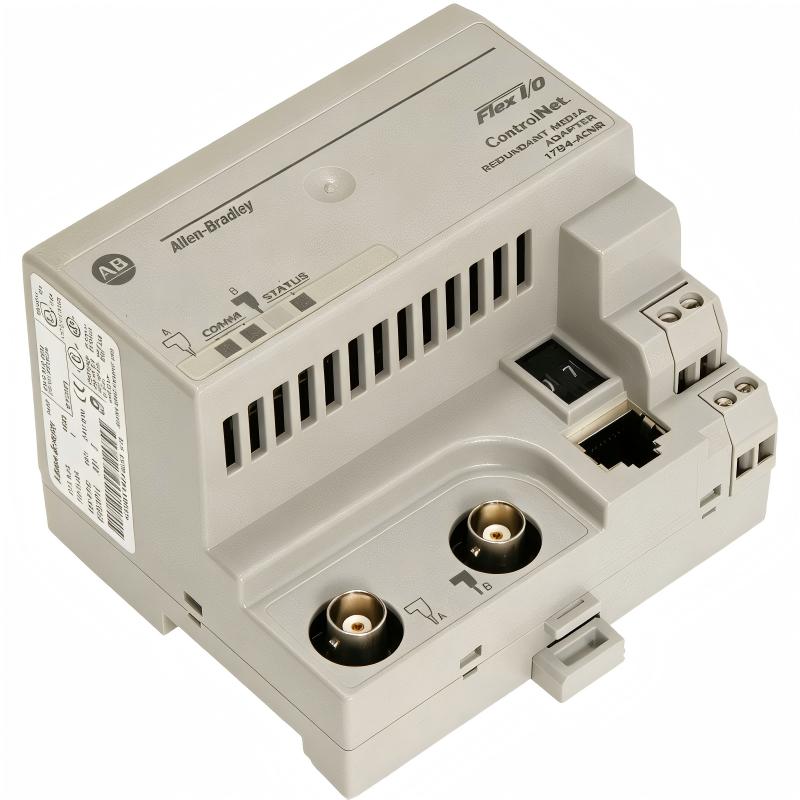
The Allen-Bradley 1794-ACNR Flex I/O ControlNet Redundant Adapter Module is used to connect distributed Flex I/O modules with ControlNet-based PLC systems. It provides a communication bridge between remote field signals and the controller, allowing engineers to build reliable distributed I/O architectures for large industrial applications.
Allen-Bradley 1794-ACNR Flex I/O ControlNet Adapter Module Application Overview
The 1794-ACNR operates as the communication interface between the ControlNet network and Flex I/O modules installed in remote locations.
Typical system structure:
ControlLogix PLC Controller
          |
          |
ControlNet Network
          |
          |
1794-ACNR Redundant Adapter
          |
          |
Flex I/O Modules
          |
          |
Sensors / Actuators
Main functions include:
- Remote I/O data communication
- ControlNet network connection
- Flex I/O module management
- Redundant communication support
- Distributed field signal transmission
Typical industrial applications:
- Process automation systems
- Manufacturing production lines
- Water treatment facilities
- Energy monitoring systems
- Large machine control platforms
In one chemical processing plant, engineers installed a 1794-ACNR adapter module to improve remote I/O communication reliability.
Initial commissioning condition:
- Adapter power status: Normal
- ControlNet communication: Active
- Remote I/O response: Unstable
The first assumption was a PLC communication problem.
The engineering team performed a complete diagnostic process:
- Checked ControlNet cable condition
- Verified network node settings
- Tested redundant communication channels
- Reviewed Flex I/O configuration
Field measurement results:
Before correction:
- Adapter status: Online
- Network signal: Available
- Remote I/O update: Intermittent
The investigation found that the network configuration did not match the actual ControlNet topology.
After correction:
- Remote I/O communication became stable
- Input data updates returned to normal
- Output response delay disappeared
The issue was caused by commissioning configuration, not adapter hardware.
Allen-Bradley 1794-ACNR Installation Preparation and ControlNet System Planning
Before installing the Flex I/O adapter module, engineers should evaluate the complete communication environment.
Preparation requirements:
- Confirm ControlNet network design
- Verify redundant cable routing
- Check 24V DC power supply
- Prepare node address information
- Confirm Flex I/O module arrangement
Installation checklist:
| Inspection Item | Engineering Requirement |
|---|---|
| Power supply | Stable 24V DC output |
| ControlNet cable | Correct installation |
| Node address | Proper configuration |
| Flex I/O modules | Correct sequence |
| Shield grounding | Reliable connection |
A common field mistake is installing the adapter physically but ignoring ControlNet network planning.
Before commissioning, engineers should confirm:
- Network topology
- Communication path
- Node assignment
- Remote I/O configuration
Allen-Bradley 1794-ACNR Flex I/O Adapter Module Installation Process
The physical installation requires careful verification of power and communication connections.
Recommended installation procedure:
- Remove power from the remote I/O system
- Install the 1794-ACNR adapter
- Connect 24V DC power
- Connect ControlNet communication cables
- Install Flex I/O modules
- Restore system power
After startup, engineers should verify:
- Adapter status indicators
- ControlNet communication condition
- Flex I/O module recognition
- PLC I/O connection status
In one field installation case:
Before correction:
- Adapter status: Normal
- Remote I/O response: Delayed
- Communication alarms: Occasional
Inspection findings:
- Redundant ControlNet channel wiring was incorrect
- Network parameters did not match the PLC configuration
After correction:
- Communication became stable
- Remote outputs responded immediately
- System passed continuous operation testing
Allen-Bradley 1794-ACNR Setup and ControlNet System Configuration
The commissioning stage requires correct network and I/O configuration.
Important setup areas:
- ControlNet node configuration
- Flex I/O module mapping
- Network scheduling
- Communication diagnostics
- Redundant path verification
Typical commissioning logic:
IF Adapter_Status = Healthy
AND ControlNet_Link = Stable
AND Flex_IO_Modules = Recognized

THEN

Enable Remote I/O Communication
Engineers should verify:
- PLC recognizes the adapter
- Input values update continuously
- Output commands reach field devices
- Communication error counters remain normal
A stable ControlNet system depends on both hardware installation and correct system configuration.
Allen-Bradley 1794-ACNR Commissioning Validation and Performance Testing
Final commissioning should confirm communication reliability under operating conditions.
Network Communication Test
Check:
- ControlNet stability
- Redundant channel operation
- Adapter diagnostics
I/O Response Test
Verify:
- Digital input response
- Analog signal updates
- Output command execution
Example field validation:
Before optimization:
- Communication interruptions: 6 times/day
- Remote I/O delay: 3 seconds
- Production alarms: Frequent
After correction:
- Communication interruption: 0
- I/O response: Stable
- 72-hour production test completed
A successful Allen-Bradley 1794-ACNR installation requires correct wiring, accurate ControlNet configuration, and complete remote I/O validation.