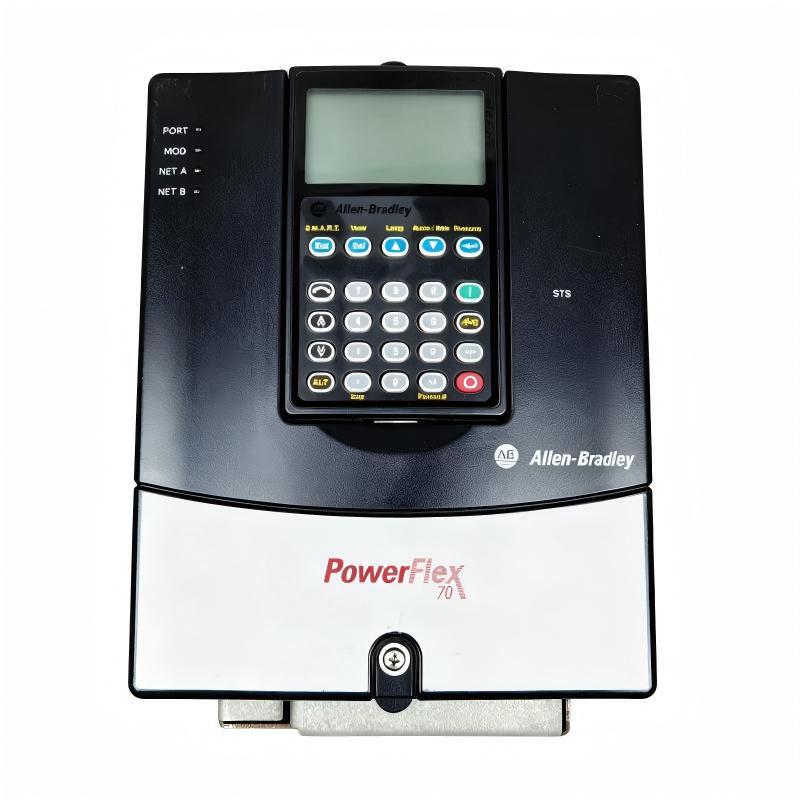
Allen-Bradley 20AD5P0A0AYYNNG0 PowerFlex 70 AC Drive Troubleshooting Guide (Fault Diagnosis)
Allen-Bradley 20AD5P0A0AYYNNG0 PowerFlex 70 AC Drive faults are commonly caused by motor overload, incorrect acceleration settings, poor power quality, communication problems, or cooling issues rather than immediate drive hardware failure. In industrial troubleshooting, engineers should analyze the complete drive system including power supply, motor condition, mechanical load, and configuration parameters.
This article describes a field case where a PowerFlex 70 drive repeatedly stopped during production operation.
Allen-Bradley 20AD5P0A0AYYNNG0 PowerFlex 70 Drive Fault Symptoms
Typical fault symptoms include:
- Drive trips during acceleration
- Motor stops unexpectedly
- Overcurrent alarms appear
- Speed command is unstable
- Drive requires frequent reset
Field case:
A conveyor system experienced repeated drive shutdowns during startup.
Initial observations:
- PLC commands were normal
- Drive display was active
- Motor stopped after acceleration began
The maintenance team suspected:
- Drive power section failure
- Motor damage
- Control board problem
Engineers started troubleshooting from the complete motor system.
Allen-Bradley 20AD5P0A0AYYNNG0 Fault Diagnosis Process and Drive Analysis
Troubleshooting path:
Power Supply
      |
      |
PowerFlex 70 Drive
      |
      |
Motor
      |
      |
Mechanical Load
Engineers checked:
- Input voltage stability
- Drive fault history
- Motor current
- Mechanical load condition
Inspection results:
- Input power: Normal
- Drive electronics: Normal
- Motor current: Excessive during startup
The problem was isolated to motor acceleration performance.
Allen-Bradley 20AD5P0A0AYYNNG0 Overcurrent Fault Investigation
Field measurements:
Before repair:
- Input voltage: 480 VAC
- Motor current during start: 165% rated current
- Acceleration time: 3 seconds
- Fault frequency: Multiple times per shift
Engineers analyzed:
- Motor parameters
- Acceleration settings
- Mechanical load condition
The investigation found:
- Acceleration time was too short
- Mechanical load required higher starting torque
The drive was protecting the motor system correctly.
Allen-Bradley 20AD5P0A0AYYNNG0 Root Cause Analysis and Recovery
The final root cause was incorrect application configuration.
Previous condition:
- Drive settings designed for unloaded motor
- Production load increased after equipment modification
Failure pattern:
Normal operation:
- Motor ran correctly under light load
Fault condition:
- Heavy startup load
- Current exceeded protection limit
- Drive stopped to prevent damage
Engineering conclusion:
The issue was parameter adjustment and application matching, not drive hardware failure.
Allen-Bradley 20AD5P0A0AYYNNG0 Troubleshooting Repair and System Recovery
Corrective actions:
Drive Parameter Adjustment
Performed:
- Increased acceleration time
- Verified motor data
- Optimized control parameters
Mechanical Inspection
Checked:
- Conveyor movement
- Bearing condition
- Load resistance
Final results:
Before repair:
- Drive trips: 5–6 times per shift
- Production interruptions: Frequent
After repair:
- Stable motor startup
- No overcurrent faults
- Continuous operation completed successfully
Allen-Bradley 20AD5P0A0AYYNNG0 Common Fault Patterns and Diagnostic Methods
Overcurrent Fault
Symptoms:
- Drive stops during acceleration
- Motor current increases rapidly
Diagnosis:
- Check motor load
- Review acceleration settings
- Measure motor current
Overvoltage Fault
Symptoms:
- Drive trips during deceleration
- DC bus voltage rises
Diagnosis:
- Check deceleration time
- Inspect braking system
- Review mechanical inertia
Communication Fault
Symptoms:
- PLC cannot control drive
- Command signals unavailable
Diagnosis:
- Check communication module
- Verify network settings
- Confirm control source parameters
Allen-Bradley 20AD5P0A0AYYNNG0 Long-Term Maintenance Strategy
For reliable PowerFlex 70 AC Drive operation:
- Record drive fault history
- Monitor motor current trends
- Check cooling conditions
- Maintain proper grounding
- Backup drive parameters regularly
A practical engineering rule:
“When a PowerFlex 70 drive trips, diagnose the complete motor-drive-load system before replacing the AC drive.”
Recommended troubleshooting sequence:
Power supply check → Drive fault history → Motor inspection → Parameter review → Mechanical load analysis → Final operation test.