Siemens 6AG1212-1HE40-2XB0 Central Processing Unit Installation Guide (Wiring, Configuration and Commissioning)
Introduction to Siemens 6AG1212-1HE40-2XB0 CPU Module
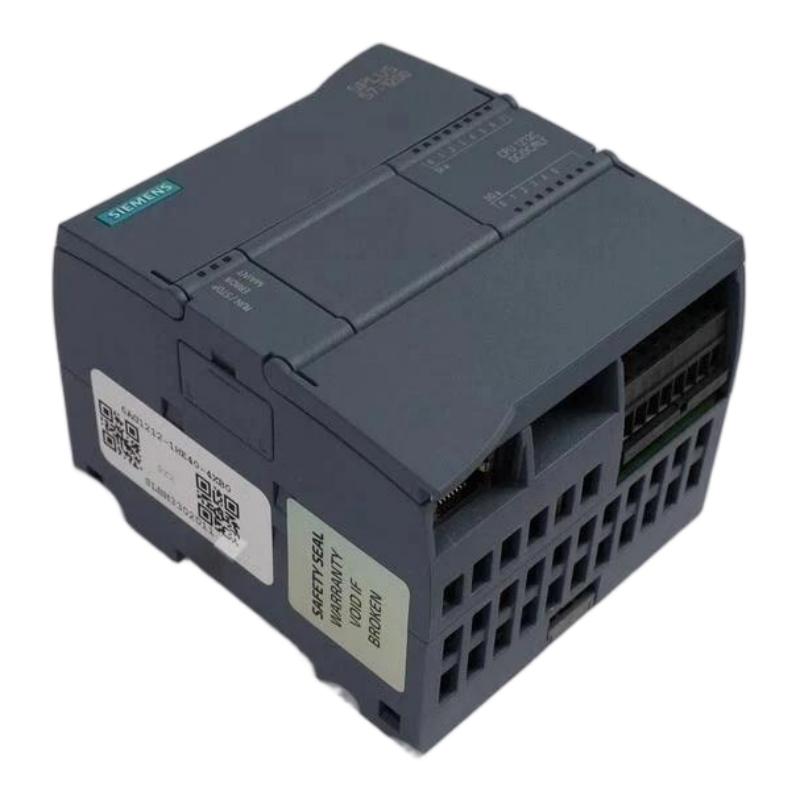
The Siemens 6AG1212-1HE40-2XB0 Central Processing Unit is an industrial PLC CPU module designed for reliable automation control applications. As part of the Siemens S7-1200 automation platform, this CPU provides powerful processing capability, flexible communication options and efficient control performance for small and medium-sized industrial automation systems.
In modern manufacturing environments, PLC controllers are widely used for machine control, process monitoring, production automation and equipment management. The CPU module works as the core component of the PLC system, responsible for executing user programs, processing input signals, controlling output devices and communicating with other automation components.
The Siemens 6AG1212-1HE40-2XB0 CPU is commonly applied in applications such as:
- Machine automation systems
- Packaging equipment
- Conveyor systems
- Industrial control panels
- Building automation
- Process monitoring systems
Correct installation and commissioning are essential to ensure stable operation and long service life.
Siemens 6AG1212-1HE40-2XB0 Installation Preparation
Before installing the Siemens 6AG1212-1HE40-2XB0 CPU module, engineers should confirm the system requirements and prepare all necessary components.
Important preparation steps include:
Verify Hardware Compatibility
Check that the CPU module matches the automation system requirements.
Confirm:
- PLC hardware configuration
- Expansion modules
- Communication modules
- Power supply requirements
- Engineering software compatibility
A correct hardware configuration helps prevent communication problems and unexpected system errors.
Prepare Installation Environment
The installation environment directly affects PLC reliability.
The CPU should be installed in a location with:
- Proper ventilation
- Low electrical interference
- Stable temperature conditions
- Protection from dust and moisture
Avoid installing PLC equipment near:
- Strong electromagnetic sources
- High-temperature equipment
- Heavy vibration environments
A suitable installation environment improves system stability.
Mechanical Installation Procedure
The Siemens 6AG1212-1HE40-2XB0 CPU is normally installed inside a control cabinet or automation enclosure.
Installation steps include:
Step 1: Mount the CPU Module
Install the CPU onto the DIN rail securely.
Make sure:
- The module is correctly positioned
- The mounting mechanism is locked
- The module has sufficient ventilation space
Step 2: Install Expansion Modules
If the automation project requires additional modules, install compatible expansion modules according to the system configuration.
Common expansion devices include:
- Digital input modules
- Digital output modules
- Analog modules
- Communication modules
Correct module arrangement helps maintain reliable communication.
Electrical Wiring Guide
Proper wiring is critical for PLC operation.
The installation process should include:
Power Supply Connection
Connect the correct power supply according to the electrical design.
Check:
- Voltage level
- Polarity
- Grounding connection
Incorrect wiring may damage the CPU module.
Input and Output Wiring
Connect field devices according to the PLC program requirements.
Typical connected devices include:
- Sensors
- Switches
- Actuators
- Motors
- Valves
Before powering the system, verify all wiring connections carefully.
Communication Configuration
The Siemens 6AG1212-1HE40-2XB0 CPU supports industrial communication functions for integration with other automation devices.
Communication setup may include:
- PLC programming connection
- HMI communication
- Industrial network configuration
- Remote monitoring systems
Engineers should configure communication parameters according to project requirements.
Siemens 6AG1212-1HE40-2XB0 Software Configuration
After hardware installation, the CPU requires software configuration.
Typical commissioning steps include:
Hardware Configuration
Create the PLC hardware configuration according to the installed modules.
PLC Program Download
Transfer the control program into the CPU.
Communication Testing
Verify communication between:
- PLC
- HMI
- Field devices
- Other controllers
System Test
Check:
- Input signals
- Output responses
- Program execution
- Alarm functions
Commissioning Procedure
A proper commissioning process ensures reliable operation.
Recommended steps:
Check Power Status
Confirm that the CPU starts normally.
Monitor PLC Status
Check diagnostic indicators.
Test Inputs
Verify that connected sensors provide correct signals.
Test Outputs
Confirm that actuators operate according to the program.
Verify Communication
Check all connected devices.
Maintenance Recommendations
To maintain long-term performance:
- Regularly check wiring conditions
- Keep the control cabinet clean
- Monitor diagnostic information
- Backup PLC programs
- Inspect communication connections
Preventive maintenance reduces unexpected downtime.