Siemens 6AG2134-6JD00-1CA1 Analog Input Module Installation Guide (Hardware Setup & Commissioning)
Introduction
The Siemens 6AG2134-6JD00-1CA1 Analog Input Module is intended for integration into an industrial automation system where analog measurement signals must be acquired and processed by a controller. Correct installation requires attention to hardware compatibility, signal wiring, channel configuration, electrical shielding, and input scaling. A structured commissioning process helps ensure that the PLC receives meaningful measurement values and that the control program interprets them correctly.
Before installation, verify the exact order number and consult the applicable Siemens technical documentation for supported signal types, input ranges, channel configuration, wiring assignments, and electrical limits. Do not assume that settings for another analog input module are interchangeable.
1. Pre-Installation Checks for the Siemens 6AG2134-6JD00-1CA1
Begin by comparing the module's complete order number with the approved bill of materials and the PLC hardware design. Check that the intended controller, mounting arrangement, and associated hardware support the module.
Prepare the following information before installation:
Hardware compatibility: Confirm the supported rack, station, base unit, and mounting position.
Signal type: Identify whether each field instrument provides a supported voltage, current, or other documented analog signal.
Input range: Match the transmitter output range to the channel configuration.
Wiring arrangement: Check the terminal assignment, channel grouping, reference connections, and shielding requirements.
Engineering configuration: Verify the correct hardware catalog entry and any firmware or software dependencies.
Field instrument details: Record the transmitter range, engineering units, and expected process values.
For a replacement, document the existing channel assignments and parameter settings before disconnecting the original module. This helps prevent incorrect scaling or channel mapping after the replacement is installed.
2. Installing and Wiring the Analog Input Module
Analog input circuits can be affected by incorrect references, loose terminals, and electrical noise. Before handling the module, isolate the relevant power sources and follow the site's lockout/tagout procedures.
Installation procedure
Confirm the installation location against the approved PLC hardware layout.
Inspect the module housing, contacts, and mounting interface for damage.
Install the module according to the manufacturer's mounting instructions.
Connect field instrument wiring using the verified terminal diagram.
Confirm that each instrument is connected to the intended input channel.
Check signal polarity and reference connections where applicable.
Route analog signal cables away from high-current conductors, motor cables, and switching equipment where practical.
Apply the specified shielding and grounding arrangement for the actual installation.
Inspect and document the completed wiring before restoring power.
For current-loop instruments, verify the transmitter's power arrangement and whether the loop is externally powered or powered through another approved arrangement. Do not connect a current loop using assumptions taken from a different input module.
3. Configure the Siemens 6AG2134-6JD00-1CA1 in the PLC Project
After mounting and wiring, configure the module in the appropriate Siemens engineering environment.
Select the exact supported catalog entry and confirm that the configured position corresponds to the physical installation. Set each channel according to the connected instrument and the signal type supported by the module.
Review these settings carefully:
Input signal type and measurement range.
Channel activation and parameter assignments.
Diagnostic options supported by the hardware.
Input addresses and PLC variable mapping.
Engineering-unit conversion and scaling logic.
Relevant hardware and firmware compatibility requirements.
The raw value received by the PLC may not be expressed directly in the engineering units used by the process. For example, a pressure transmitter with a 0–10 bar measurement range may require a scaling calculation to convert the module's raw input value into bar. The correct conversion depends on the configured range and the module's documented raw-value representation.
Before downloading the configuration, compare it with the existing project and confirm that any changes are authorized. Incorrect channel parameters can produce plausible but inaccurate process readings, which may be more difficult to detect than a complete signal failure.
4. Commissioning and Temperature Measurement Verification
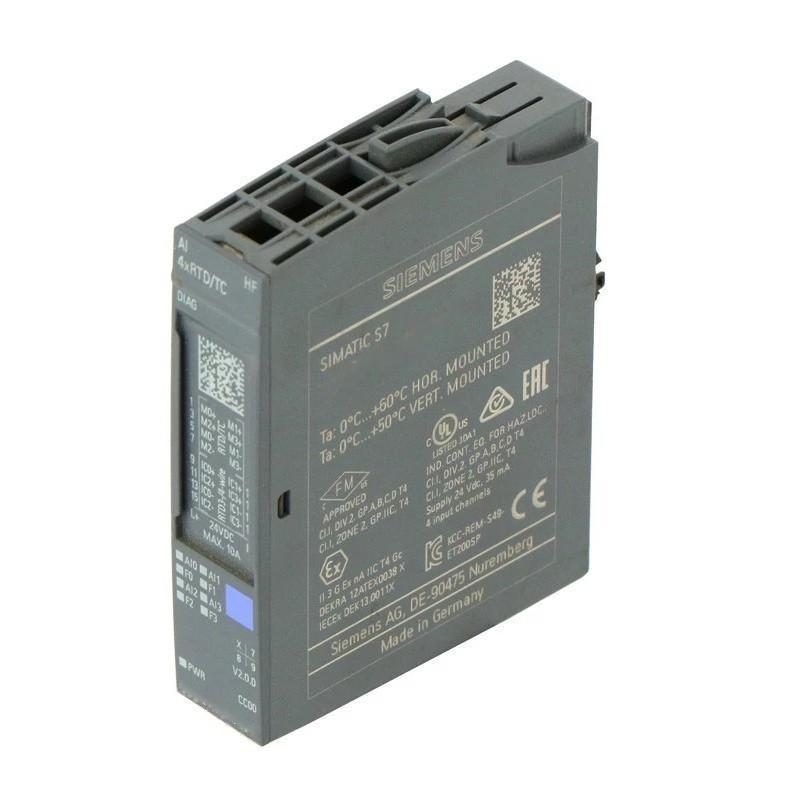
The 6AG2134-6JD00-1CA1 is a SIPLUS ET 200SP AI 4xRTD/TC HF analog input module with four inputs for resistance temperature detectors (RTDs) and thermocouples. It supports 2-wire, 3-wire, and 4-wire connection methods, subject to the sensor type and configuration.
asset.conrad.com+1
During commissioning, test each channel with the sensor type and wiring arrangement selected in the engineering project.
Test | Verification | Expected result |
|---|---|---|
Hardware recognition | Check the module in engineering diagnostics | Correct module identification |
Sensor configuration | Compare the configured input type with the connected sensor | No configuration mismatch |
Wiring integrity | Inspect sensor leads and terminal assignments | Correct connection and polarity |
Temperature reading | Compare the PLC value with a reference instrument | Reading agrees within the applicable accuracy limits |
Channel diagnostics | Review available channel status and diagnostic messages | No unexplained faults |
Operating stability | Monitor values during representative process conditions | Stable readings without unexpected jumps |
For an RTD installation, verify the selected sensor type, such as Pt100 or Pt1000, and the chosen 2-wire, 3-wire, or 4-wire connection. For a thermocouple, confirm the thermocouple type, polarity, and required reference-junction compensation settings.
Allow for the module's configured conversion time and filtering behavior when evaluating response speed. A displayed temperature that changes slowly is not necessarily a hardware fault; the selected integration time and smoothing settings may affect the response.
5. Field Case: Temperature Reading Differs from the Reference Instrument
During commissioning of a process heating system, one temperature channel consistently reports a value that differs from a calibrated reference thermometer. The reading remains relatively stable, so the technician initially suspects sensor calibration.
The engineer first verifies that the correct RTD type is selected in the PLC configuration. Next, the sensor wiring is compared with the selected connection method. The inspection reveals that the field sensor is wired using a three-wire arrangement, while the channel configuration and terminal connections do not match the intended design.
After correcting the wiring and verifying the channel parameters, the engineer compares the reading against the reference instrument again under stable temperature conditions.
The important diagnostic lesson is to verify sensor type, wiring topology, and configuration before attempting calibration or replacing the analog input module.
6. Installation Acceptance Checklist
Before placing the system into service, confirm that:
The module is compatible with the selected ET 200SP hardware arrangement.
The required BaseUnit type is supported and correctly installed.
Every channel is configured for the connected RTD or thermocouple type.
Sensor wiring follows the specified 2-wire, 3-wire, or 4-wire arrangement.
Thermocouple polarity and reference-junction compensation have been checked where applicable.
Engineering-unit conversion and channel assignments are correct.
Temperature readings have been compared with an appropriate reference.
Diagnostic messages have been reviewed and documented.
Final hardware and parameter settings have been saved.