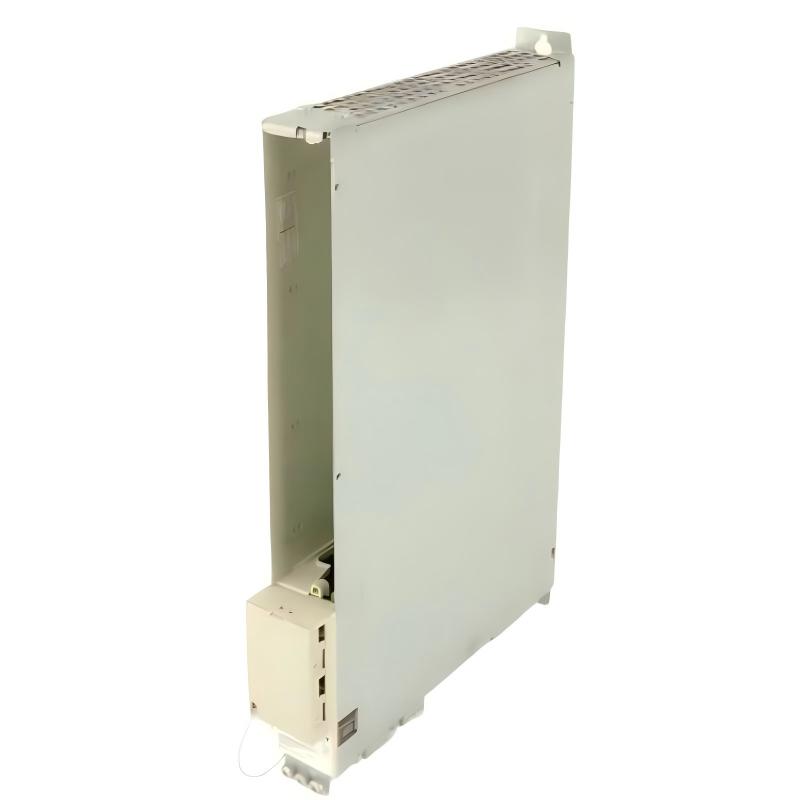
Siemens 6SN1123-1AB00-0HA1 Power Module Troubleshooting Guide (Drive Startup Fault Diagnosis)
Introduction
When a Siemens 6SN1123-1AB00-0HA1 Power Module is associated with a drive startup failure, unexpected shutdown, or recurring drive alarm, the cause may involve the incoming supply, drive-system compatibility, cooling, motor-side conditions, or another component in the drive assembly. A systematic investigation helps distinguish a power-module fault from problems elsewhere in the system.
The exact diagnostic behavior and electrical characteristics must be confirmed against the documentation for this specific order number. The following workflow focuses on safe fault isolation and evidence-based diagnosis rather than assuming that every SIMODRIVE module uses identical connections or protection functions.
1. Record the Drive Fault Before Resetting
Start by recording the exact alarm or fault information displayed by the drive system or engineering software.
Note the operating condition when the fault occurs:
During initial power-up.
When the drive is enabled.
During motor acceleration.
After extended operation.
When a particular axis or machine sequence starts.
After a recent maintenance or configuration change.
Determine whether the fault affects one drive or multiple drives sharing a supply or cabinet. Record the diagnostic code, message, timestamp, and any relevant operating data available from the system.
Avoid repeatedly resetting the drive before preserving the evidence. A reset may temporarily clear a symptom without resolving the underlying cause, making an intermittent fault harder to diagnose.
2. Check the Incoming Supply and Protective Circuit
If the drive does not start or reports a supply-related fault, inspect the upstream electrical system first.
With the equipment safely isolated, check the accessible connections, protective devices, and wiring against the approved electrical drawings. Look for loose terminals, discoloration, damaged conductors, or signs of overheating.
If the installation procedure permits energized measurements, qualified personnel should verify the supply at designated test points and compare the results with the specified limits. Where appropriate, investigate whether the supply remains stable during the operating event that triggers the fault.
Do not assume that a power-module fault is confirmed merely because the drive cannot reach its ready state. An upstream supply issue or an incorrect protective-device arrangement can produce similar symptoms.
3. Investigate Compatibility and Drive-System Configuration
A replacement module may be physically installable without being suitable for the existing drive configuration.
Verify the complete order number and compare it with the machine's approved hardware list. Check the compatibility of the associated drive components, mounting arrangement, electrical interfaces, and documented configuration requirements.
Review recent changes to drive parameters or component assignments. If the problem began after maintenance, compare the current configuration with the last known working record.
Do not install unverified firmware, alter parameters at random, or substitute a similar-looking module to test a theory. Each change should be supported by the applicable documentation and an approved maintenance procedure.
4. Examine Cooling and Thermal Conditions
A drive that operates initially but trips after sustained operation may be affected by inadequate cooling, excessive cabinet temperature, or operating conditions outside the specified limits.
Inspect the cabinet ventilation system and confirm that airflow paths are not blocked. Check for accumulated dust, obstructed filters, failed cabinet fans, or other environmental conditions that could affect heat removal.
Review the diagnostic history to determine whether the fault correlates with operating duration or increased machine load. If thermal warnings or temperature-related diagnostics are available, record them and compare them with the manufacturer's guidance.
Do not assume that every power-module variant reports internal temperature in the same way. Use the diagnostic functions actually supported by the installed hardware.
5. Check the Motor and Associated Drive Components
A startup or operation fault may originate outside the power module.
Review the motor-side wiring, connector condition, and associated components against the approved system diagrams. Inspect for damaged cables, incorrect connections, or signs of overheating. Verify that the motor and connected drive components are suitable for the installed system configuration.
If a fault occurs only when a particular axis is enabled, compare that axis's diagnostic information with the behavior of unaffected axes. This may help isolate a local motor-side issue from a common supply or system-level problem.
Any insulation-resistance or other electrical tests must follow the manufacturer's prescribed procedure. Disconnect sensitive drive electronics as required before testing cables or motors; applying an unsuitable test voltage to connected electronics can cause damage.
6. Field Case: Drive Trips After Extended Operation
A production machine runs normally at startup but stops after a period of continuous operation. The drive diagnostic record shows that the shutdown occurs repeatedly after the machine has been running under load.
The maintenance engineer records the fault timing and checks the cabinet ventilation, surrounding temperature, and available drive diagnostics. Inspection identifies an obstructed airflow path that prevents the cabinet from maintaining its intended cooling conditions.
The team corrects the ventilation problem, verifies that the cabinet meets the documented operating requirements, and repeats the same production sequence under controlled conditions. The system is monitored to confirm whether the shutdown recurs.
If the fault disappears, the results support a cooling-related cause. If it persists, the investigation should continue with supply stability, load conditions, configuration, and the documented drive diagnostics rather than assuming that the module is defective.
7. Troubleshooting Reference Table
Observed symptom | Possible cause | Recommended action |
|---|---|---|
Drive fails during initial startup | Supply issue, compatibility mismatch, or configuration discrepancy | Verify supply conditions, order number, and system configuration |
Drive does not reach its ready state | Upstream circuit or associated-component problem | Review diagnostic information and approved electrical drawings |
Fault occurs after sustained operation | Cooling problem or operating conditions outside specified limits | Inspect airflow and review thermal-related diagnostics |
Fault appears when one axis is enabled | Motor-side wiring or axis-specific component issue | Check the affected axis and associated connections |
Fault begins after module replacement | Incorrect hardware selection or configuration mismatch | Compare the replacement with the approved component list |
Fault persists after external checks | Possible internal module fault or unresolved system issue | Preserve diagnostics and escalate for documented component-level testing |
These are potential diagnostic paths, not definitive fault identifications. Confirm the cause through documented tests and observed results.
8. When to Replace the Power Module
Consider replacement only after the supply, protective circuit, cooling, drive configuration, and associated components have been checked.
Before removing the Siemens 6SN1123-1AB00-0HA1, isolate all relevant energy sources and observe the manufacturer's discharge and verification procedures. Record the original wiring, component identification, diagnostic history, and configuration information.
Confirm that the replacement is approved for the exact drive system. After installation, perform the required static checks and controlled commissioning tests before returning the machine to production.
If the same fault occurs with a verified replacement, investigate the surrounding drive system again rather than assuming that the replacement is also defective.
9. Preventive Maintenance Recommendations
To reduce recurring power-module and drive-system faults:
Inspect electrical connections and protective devices during scheduled maintenance.
Keep cabinet ventilation paths clear and maintain required cooling conditions.
Preserve diagnostic records before resetting recurring faults.
Verify component compatibility before replacing drive hardware.
Document approved parameter and wiring changes.
Check motor-side wiring and associated components when faults are axis-specific.
Follow the manufacturer's safety procedures for all electrical measurements and maintenance work.
Reliable diagnosis depends on separating supply problems, configuration issues, cooling conditions, motor-side faults, and possible module defects. This structured process helps reduce unnecessary replacement and supports safer, more efficient restoration of industrial drive systems.