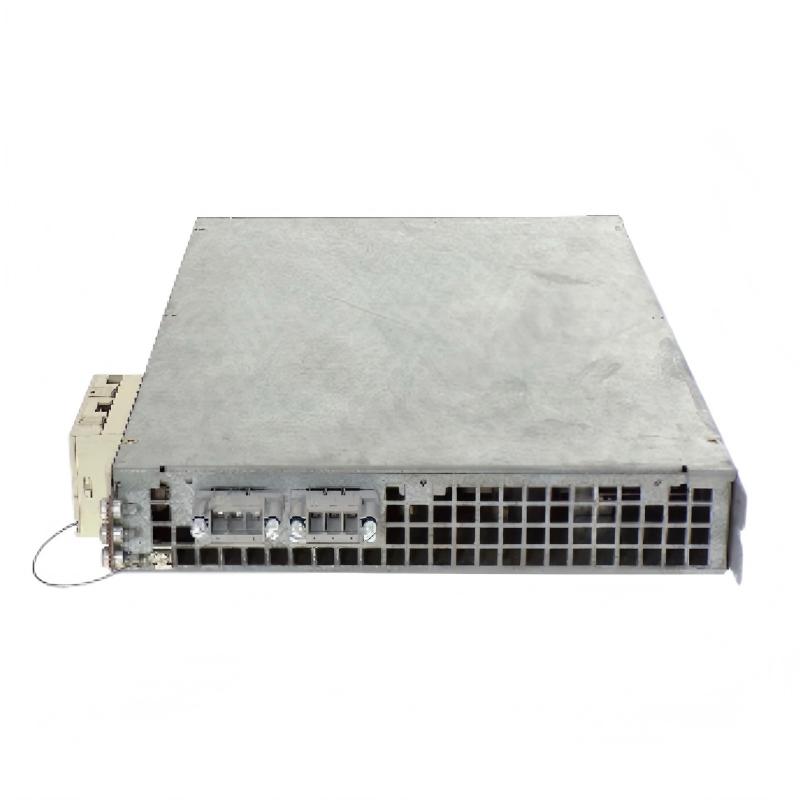
Siemens 6SN1123-1AB00-0HA0 Power Module Installation Guide (Hardware Setup and Commissioning)
The Siemens 6SN1123-1AB00-0HA0 Power Module is associated with Siemens drive-system hardware used in industrial motion control applications. Proper installation requires careful verification of the module version, drive-system compatibility, electrical connections, cooling conditions, and control-system configuration. Before commissioning, engineers should confirm that the replacement module matches the existing equipment and follow the applicable Siemens installation and safety instructions.
1. Pre-Installation Checks for the Siemens 6SN1123-1AB00-0HA0
Before installing the power module, inspect the equipment cabinet and verify the complete ordering number on the module nameplate. Similar Siemens drive modules can have different electrical ratings or hardware configurations, so physical similarity alone is not sufficient to establish compatibility.
Check the following items before beginning work:
Confirm the model number and hardware version against the equipment documentation.
Inspect the module housing, connectors, terminals, and mounting surfaces for damage.
Check the cabinet for dust accumulation, excessive moisture, oil contamination, and signs of overheating.
Verify that the associated drive system, motor, power supply, and control components are compatible.
Review the original wiring diagrams and record the existing terminal connections before removing an installed unit.
Safety note: Disconnect all relevant power sources and follow the specified lockout/tagout procedure. Wait for the manufacturer's specified DC-link discharge period and verify the absence of hazardous voltage using an appropriately rated instrument before touching electrical connections.
2. Mechanical Installation and Cabinet Preparation
Correct mechanical installation helps prevent connector stress, poor heat dissipation, and intermittent operation.
Mount the Siemens 6SN1123-1AB00-0HA0 in the designated drive-system position. Ensure that the mounting surfaces are clean and that the module is aligned with the corresponding mechanical guides, connectors, or fixing points.
During installation:
Confirm that the cabinet dimensions and mounting arrangement match the equipment design.
Position the module without forcing it into place.
Secure all specified mounting points according to the manufacturer's instructions.
Check that adjacent components do not obstruct the cooling airflow.
Verify that cables are routed away from sharp edges and excessive mechanical stress.
Do not modify mounting hardware or force a connector to fit. Resistance during insertion can indicate incorrect alignment, contamination, or an incompatible component.
3. Electrical Connection and Power Supply Verification
Electrical checks should be completed before the drive system is energized. The exact terminal assignments, permissible supply conditions, and connection sequence must be confirmed from the documentation for the installed drive configuration.
Pay particular attention to:
Power connections: Verify conductor identification, terminal assignment, and connection security.
Protective grounding: Confirm that the protective earth connection follows the equipment's grounding design.
Control connections: Check the associated control and interface wiring for correct routing and secure contact.
Cable condition: Inspect insulation, shielding where applicable, and connector locking mechanisms.
Power distribution: Verify the condition of upstream protection devices and the relevant supply circuits.
Do not infer terminal assignments from another 6SN1123 variant. If the original wiring is unclear, resolve the discrepancy before applying power.
4. Drive Configuration and System Compatibility
A correctly mounted power module may still fail to operate if it is incompatible with the installed drive configuration. Before commissioning, compare the module's identification data with the machine's electrical drawings, drive documentation, and replacement records.
Review the following:
Verification item | Required action |
|---|---|
Module identification | Confirm the complete ordering number and applicable hardware version |
Drive-system compatibility | Verify that the module is approved for the installed drive arrangement |
Motor configuration | Check the associated motor data and drive configuration |
Control interface | Confirm that the connected control hardware and wiring match the system design |
Protection settings | Verify that applicable protective devices and parameters are correct |
Replacement records | Confirm whether any configuration or commissioning steps are required after replacement |
Avoid changing multiple parameters at once. Record the original settings and make only documented changes so that any commissioning problem can be traced efficiently.
5. Siemens 6SN1123-1AB00-0HA0 Power Module Commissioning Procedure
After mechanical installation and electrical verification, commission the equipment in a controlled sequence.
Stage 1 — Pre-power inspection
Check all accessible connections, protective grounding, mounting points, and cabinet ventilation. Remove tools and loose materials from the drive cabinet.
Stage 2 — Initial energization
Restore power according to the machine's approved startup procedure. Observe the drive system for abnormal noise, unusual odor, visible smoke, unexpected indicators, or protective-device operation. If any abnormal condition appears, stop the procedure and investigate before continuing.
Stage 3 — Control-system verification
Review available drive diagnostics and control-system status information. Confirm that the equipment recognizes the expected hardware configuration and that no unresolved faults remain.
Stage 4 — Controlled functional test
Where the machine design permits, perform a low-risk functional test under controlled conditions. Confirm the intended enable sequence, motor response, and stop behavior without immediately applying the full production load.
Stage 5 — Operational acceptance
Run the equipment through a representative operating cycle while monitoring drive diagnostics, cabinet temperature, and system behavior. Confirm that the machine operates consistently before returning it to production.
6. Installation Case: Drive Fails to Enable After Module Replacement
A machine maintenance team replaces a power module after a drive-system fault. The new unit is mechanically installed, but the drive does not enter the expected operating state.
Rather than immediately replacing the new module, the engineer checks the system in a structured order:
Confirms that the replacement's complete ordering number matches the approved spare-parts specification.
Reviews the drive diagnostic history to identify the active fault or missing enable condition.
Checks the supply and protective circuits using the applicable electrical drawings and approved measurement procedure.
Inspects the control wiring and associated interface connections.
Compares the installed hardware and configuration with the machine's commissioning records.
The investigation reveals a discrepancy between the installed replacement and the documented drive configuration. After compatibility is established and the required configuration checks are completed, the engineer repeats the startup procedure.
Key lesson: A failure to enable after replacement does not automatically indicate a defective power module. Hardware compatibility, control conditions, wiring, and system configuration should be checked before the module is condemned.
7. Installation Acceptance Checklist
Inspection point | Acceptance requirement |
|---|---|
Model verification | Complete ordering number matches the approved configuration |
Mechanical mounting | Module is correctly seated and secured |
Electrical connections | Wiring matches the applicable drawings |
Protective grounding | Grounding arrangement has been verified |
Cabinet environment | Cooling paths are clear and conditions are suitable |
Drive diagnostics | No unresolved startup faults remain |
Functional test | Required motion and stop functions operate correctly |
Documentation | Installation and commissioning results are recorded |
8. Maintenance Recommendations
To maintain reliable operation of the Siemens 6SN1123-1AB00-0HA0 Power Module, establish a routine inspection schedule based on the machine's operating environment and maintenance requirements.
Inspect cabinet ventilation and remove accumulated dust using an approved method.
Check accessible electrical connections during scheduled maintenance, following the required isolation procedure.
Review drive fault histories for recurring alarms or abnormal operating patterns.
Investigate repeated protective trips instead of repeatedly resetting the drive.
Record module replacements, configuration changes, and commissioning results.
A documented installation and commissioning process reduces avoidable startup delays and helps maintenance teams distinguish installation errors from genuine hardware failures.