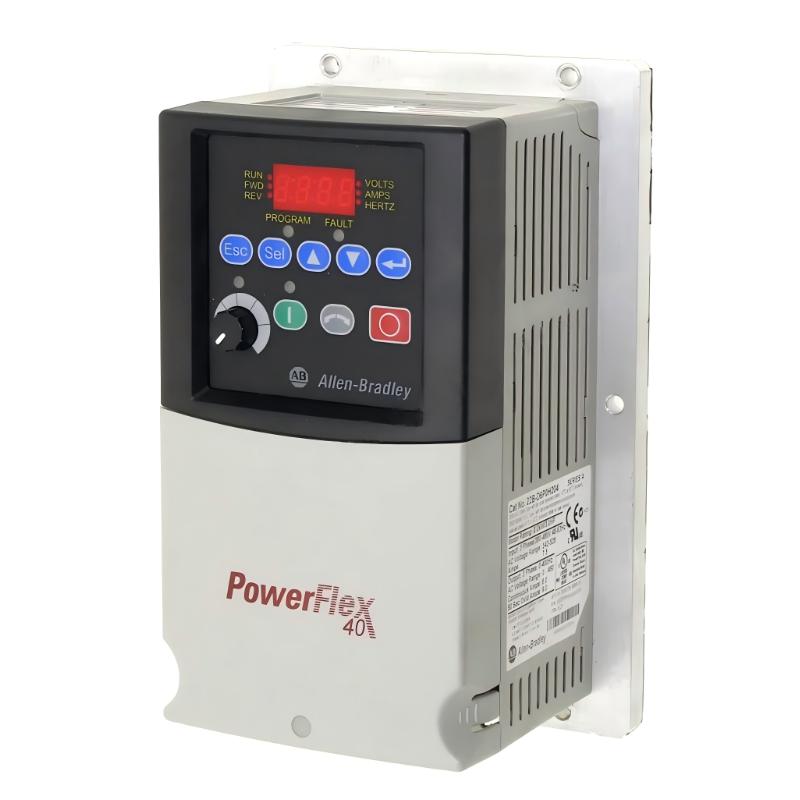
Allen Bradley 22B-D6P0H204 PowerFlex 40 Troubleshooting Guide (Motor Overload and Unexpected Drive Trips)
When an Allen Bradley 22B-D6P0H204 PowerFlex 40 AC Drive trips during normal motor operation, an overload condition may be responsible. However, the actual cause can involve excessive mechanical load, incorrect motor parameters, poor cooling, unstable supply conditions, or a motor fault. A systematic diagnosis helps determine whether the problem is in the drive, motor, wiring, or connected machinery.
1. Recognizing Motor Overload Symptoms
Motor overload problems may develop gradually or occur during specific operating conditions.
Typical symptoms include:
The drive operates normally at low speed but trips under heavier load.
The motor becomes unusually hot.
The drive trips after running for a period of time.
Motor current remains higher than expected.
The motor accelerates slowly or struggles to maintain speed.
The fault appears when the machine processes heavier material or reaches higher production rates.
Record the displayed fault code and operating conditions before resetting the drive.
A drive overload indication and a motor overload condition are related but not necessarily identical. Use the exact fault code to identify which protection function has operated.
2. Checking Motor Current and Mechanical Load
The first step is to determine whether the motor is drawing more current than expected.
Compare the measured operating current with the motor nameplate full-load current and the drive's applicable ratings.
Check the connected equipment for mechanical resistance:
Conveyor belts that are too tight or obstructed.
Pump impellers affected by deposits or blockages.
Fan bearings with excessive friction.
Gearboxes with insufficient lubrication.
Couplings that are misaligned.
Mechanical components that have become damaged or worn.
A motor may operate normally without a mechanical load but trip when the machine is running under production conditions.
If the current increases significantly when the load changes, investigate the mechanical system before modifying drive protection settings.
3. Verifying Motor Parameters in the PowerFlex 40
Incorrect motor parameters can affect drive operation and protection behavior.
Check the following configuration items:
Parameter Area | Diagnostic Check |
|---|---|
Motor Rated Voltage | Matches the motor nameplate |
Motor Rated Current | Correctly entered |
Motor Rated Frequency | Matches the motor specification |
Motor Rated Speed | Consistent with the motor nameplate |
Motor Connection | Correct star/delta configuration |
Overload Settings | Appropriate for the motor |
Maximum Frequency | Within the motor and machine limits |
Acceleration Time | Suitable for the mechanical load |
A common mistake is entering the drive's rated current instead of the motor's actual rated current. The motor's nameplate should be the primary reference for motor-related configuration.
If the motor has been replaced, review all relevant parameters instead of assuming that the previous settings remain valid.
4. Overload Trips During Low-Speed Operation
A motor may experience cooling difficulties when operating continuously at low speed, particularly when it relies on a shaft-mounted cooling fan.
At reduced motor speed, the motor's own cooling fan may move less air. If the motor continues to deliver substantial torque, its temperature can increase even when the drive's output current appears reasonable.
Investigate:
Whether the motor is designed for continuous low-speed operation.
Whether an independent cooling fan is required.
Whether the application demands high torque at low frequency.
Whether the motor temperature rises during extended operation.
Whether the operating speed is below the motor manufacturer's recommended range.
Do not assume that reducing the drive's output frequency automatically reduces motor heating.
For applications requiring continuous low-speed operation, consider the motor's thermal characteristics and whether additional cooling or a different motor arrangement is necessary.
5. Checking Power Supply and Electrical Connections
Unstable supply conditions or poor electrical connections can contribute to abnormal motor operation.
Inspect the incoming power circuit for:
Voltage outside the permitted range.
Phase imbalance.
Loose input terminals.
Damaged conductors.
Incorrect branch-circuit protection.
Signs of overheating or discoloration.
Check the motor output wiring for loose connections, insulation damage, and abnormal resistance.
All electrical inspections must be performed using appropriate isolation procedures. Do not disconnect motor wiring while the drive is energized.
If the supply voltage is unstable, record measurements during both idle and loaded operation. This can help identify voltage drops that appear only when other equipment starts.
6. Distinguishing Overload Faults from Other PowerFlex 40 Trips
Not every drive trip indicates motor overload.
Fault Condition | Possible Investigation Area |
|---|---|
Motor overload | Motor current, mechanical load, cooling, overload settings |
Overcurrent | Short circuit, excessive starting torque, acceleration settings |
DC bus overvoltage | Deceleration ramp, regenerative energy, supply conditions |
Undervoltage | Incoming supply, voltage drops, loose connections |
Heatsink overtemperature | Cooling airflow, cabinet temperature, fan condition |
Ground fault | Motor insulation, cable damage, grounding path |
Always use the actual fault code and the PowerFlex 40 manual to determine the correct diagnostic procedure.
7. Checking Acceleration and Deceleration Settings
Incorrect ramp settings can create operating conditions that contribute to motor or drive trips.
An acceleration time that is too short may cause excessive current during startup. A deceleration time that is too short may produce DC bus overvoltage during stopping.
For troubleshooting:
Record the existing acceleration and deceleration settings.
Check the mechanical inertia of the driven equipment.
Observe current during startup.
Check whether the fault occurs during acceleration or normal operation.
Adjust ramp settings only after confirming that the motor and load are mechanically sound.
Do not increase acceleration time or alter protection settings simply to suppress repeated faults. Correct the underlying problem first.
8. A Practical Troubleshooting Procedure
A structured inspection helps reduce unnecessary replacement of drive components.
Step 1: Record the fault
Write down the exact fault code, motor speed, output current, operating time, and machine condition.
Step 2: Inspect the mechanical system
Check the motor, coupling, gearbox, bearings, conveyor, pump, or fan for excessive resistance.
Step 3: Verify motor parameters
Compare the configured voltage, current, frequency, and overload settings with the motor nameplate.
Step 4: Check cooling
Inspect the motor cooling fan, drive ventilation openings, cabinet airflow, and ambient temperature.
Step 5: Inspect the electrical circuit
Check supply voltage, phase balance, grounding, and terminal connections.
Step 6: Perform a controlled operating test
After correcting the identified problem, restart the equipment under controlled conditions and monitor current and temperature.
If the same fault returns, stop the equipment and continue diagnosis instead of repeatedly resetting the drive.
9. When Should the PowerFlex 40 Drive Be Repaired or Replaced?
A drive should not be replaced simply because it displays an overload-related fault. External causes must be eliminated first.
Consider professional drive inspection if:
The same fault occurs with a verified motor and mechanical load.
The drive displays abnormal behavior despite correct parameter settings.
Power terminals or internal components show physical damage.
The drive cannot operate normally with a suitable, verified motor circuit.
Cooling and incoming power conditions have been confirmed as satisfactory.
Before replacement, back up the parameter configuration and record the complete catalog number, series, firmware information, and control settings.
Internal repair should be performed by qualified personnel. The drive's DC bus can retain hazardous voltage after incoming power has been disconnected.
10. Troubleshooting FAQs for Allen Bradley 22B-D6P0H204
Q1: Why does the 22B-D6P0H204 trip during normal motor operation?
Possible causes include excessive mechanical load, incorrect motor parameters, poor cooling, unstable incoming voltage, or motor insulation problems. Check the exact fault code before deciding which component is defective.
Q2: Why does the motor become hot when running at low speed?
The motor's shaft-mounted cooling fan may provide insufficient airflow at reduced speed. Continuous low-speed operation with high torque can cause overheating.
Q3: Can incorrect motor rated current settings cause overload trips?
Yes. Incorrect motor current information can affect overload protection behavior. Compare the configured value with the actual motor nameplate.
Q4: Why does the drive trip only when the conveyor carries material?
The additional mechanical load may increase motor current beyond the expected operating level. Inspect belt tension, rollers, bearings, gearbox condition, and material loading.
Q5: Can a mechanical problem cause a PowerFlex 40 overload fault?
Yes. Binding, misalignment, worn bearings, and blocked equipment can increase the torque required from the motor.
Q6: Why does the drive work normally at low load but trip at high load?
The motor may be approaching its current or thermal limits. Check the mechanical load, motor sizing, and operating current.
Q7: Can poor cabinet ventilation cause drive trips?
Yes. High ambient temperature and restricted airflow can cause the drive to overheat and activate thermal protection.
Q8: Should I increase the motor overload setting to prevent repeated trips?
Not without a verified engineering reason. The setting must protect the connected motor and comply with its rated operating conditions. Increasing it without diagnosis may expose the motor to damage.
Q9: How can I distinguish an overload fault from an overcurrent fault?
Check the exact fault code. Overload protection generally relates to sustained thermal loading, while overcurrent protection responds to excessive current conditions that may occur rapidly.
Q10: What information should be provided when requesting PowerFlex 40 repair support?
Provide the complete model number, fault code, motor nameplate information, operating current, supply voltage, parameter backup, and a description of when the fault occurs.