Siemens 6AG4114-3JA12-0XX2 Rack-Mount Industrial PC Installation Guide (System Setup & Commissioning)
Siemens 6AG4114-3JA12-0XX2 Rack-Mount Industrial PC Installation Guide for Industrial Automation Systems
Siemens 6AG4114-3JA12-0XX2 Rack-Mount Industrial PC installation problems are usually related to system integration, power preparation, and configuration settings rather than the industrial PC hardware itself. A correct commissioning process ensures stable operation when the IPC is used for SCADA visualization, industrial data processing, machine control applications, and automation system management.
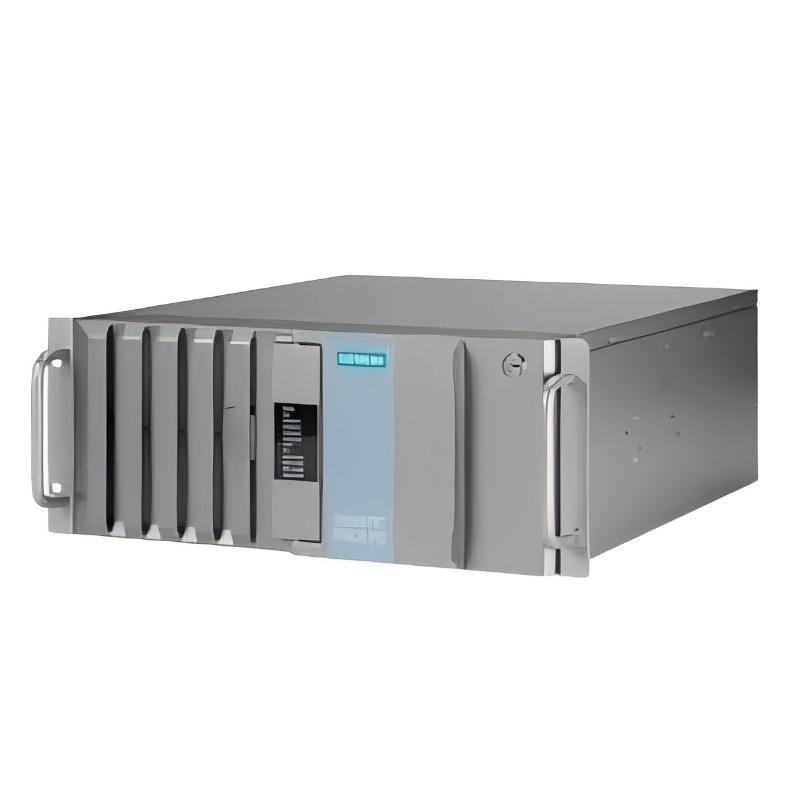
The Siemens 6AG4114-3JA12-0XX2 Rack-Mount Industrial PC is designed for industrial environments where continuous computing performance, high reliability, and compatibility with automation software are required. Unlike standard commercial computers, an industrial PC must be installed with attention to electrical noise, thermal conditions, grounding, network architecture, and software configuration.
This Installation Guide explains the engineering approach used when installing the Siemens 6AG4114-3JA12-0XX2 Industrial PC in factory automation applications, including rack preparation, wiring inspection, operating system setup, communication configuration, and commissioning verification.
Siemens 6AG4114-3JA12-0XX2 Industrial PC Installation Preparation and Site Requirements
Before mounting the Siemens 6AG4114-3JA12-0XX2 Rack-Mount Industrial PC, engineers normally evaluate the installation environment first.
In industrial control cabinets, the main risks are not always visible. Excessive heat, vibration, unstable power supply, and electromagnetic interference can reduce system reliability even when the IPC starts normally.
Typical preparation checks include:
- Cabinet dimensions and rack mounting space
- Cooling airflow direction
- AC power quality
- Protective grounding condition
- Ethernet network availability
- Peripheral device requirements
- Automation software compatibility
For example, in one factory commissioning project, an industrial PC installation failed during the first startup because the cabinet temperature exceeded 45°C. The IPC powered on correctly, but system performance decreased after several hours due to insufficient ventilation. After improving cabinet airflow and adding temperature monitoring, the operating temperature was reduced to approximately 32°C and the system remained stable during continuous operation.
This type of field experience shows why industrial PC commissioning is not only about mechanical installation.
Siemens 6AG4114-3JA12-0XX2 Rack-Mount IPC Mechanical Installation Guide
The rack-mounted design of the Siemens 6AG4114-3JA12-0XX2 requires correct mechanical positioning to avoid long-term stress on the chassis.
During installation, engineers usually confirm:
- Rack rail alignment
- Mounting screw tightness
- Clearance around ventilation openings
- Cable bending radius
- Accessibility for maintenance
The industrial PC should be installed in a cabinet location with sufficient air circulation. Avoid placing the IPC directly above heat-generating devices such as power converters or large motor drives.
A common field mistake is installing the IPC too close to frequency converters. Although the computer may operate initially, electrical noise from drives can affect communication stability.
A practical installation arrangement is:
- Upper cabinet area: industrial PC and network equipment
- Middle area: PLC controllers and I/O modules
- Lower area: power components and motor control devices
This separation helps reduce electromagnetic interference.
Siemens 6AG4114-3JA12-0XX2 Power Connection and Electrical Setup Procedure
The power supply connection is one of the most important parts of Siemens 6AG4114-3JA12-0XX2 Setup and Commissioning.
Before applying power, technicians normally check:
- Input voltage measurement
- Protective earth connection
- Power cable polarity
- Fuse protection
- UPS connection if required
A typical verification process:
- Measure incoming voltage using a calibrated multimeter.
- Confirm grounding resistance meets site requirements.
- Check that no short circuit exists on peripheral connections.
- Energize the system and observe startup behavior.
During one commissioning case, the IPC showed intermittent restart behavior after installation. The measured supply voltage dropped from 230 VAC to 198 VAC when nearby equipment started. After replacing the overloaded power circuit, the voltage remained within the expected range and the restart issue disappeared.
This troubleshooting experience demonstrates that power stability is a critical part of industrial PC installation.
Siemens 6AG4114-3JA12-0XX2 System Configuration and Software Commissioning
After hardware installation, the next stage is Siemens 6AG4114-3JA12-0XX2 System Configuration.
The commissioning engineer typically configures:
- Operating system parameters
- Network settings
- Industrial communication protocols
- Automation software environment
- User access permissions
- Data storage configuration
For automation applications, the IPC may communicate with:
- PLC controllers
- HMI systems
- SCADA platforms
- Industrial databases
- Remote maintenance systems
During commissioning, network communication should be tested before loading production applications.
Example diagnostic logic:
Check IP Address
        ↓
Ping PLC Controller
        ↓
Verify Communication Port
        ↓
Test Data Exchange
        ↓
Start Application Software
This method prevents software issues from being confused with network hardware problems.
Siemens 6AG4114-3JA12-0XX2 Rack-Mount Industrial PC Commissioning Validation
A complete commissioning process should include operational verification.
Important checks include:
Hardware Validation
- CPU operation
- Memory recognition
- Storage status
- Fan operation
- Temperature monitoring
Communication Validation
- Ethernet connection
- PLC communication
- Remote access testing
- Data exchange verification
Application Validation
- Startup sequence
- Runtime software operation
- Alarm display
- Data logging function
In one production line upgrade, engineers completed a 72-hour continuous running test after installing the Siemens 6AG4114-3JA12-0XX2 Industrial PC. The system maintained stable communication with PLC controllers, with network latency remaining below 5 ms during normal operation.
This type of validation helps ensure the IPC is ready for industrial operation.
Siemens 6AG4114-3JA12-0XX2 Long-Term Installation Recommendations
For reliable operation, maintenance teams should regularly check:
- Cabinet temperature
- Cooling performance
- Storage health
- Network connection quality
- Operating system status
Industrial PCs often operate continuously for years, so preventive maintenance is important.
A well-installed Siemens 6AG4114-3JA12-0XX2 Rack-Mount Industrial PC can provide stable computing support for automation systems, production monitoring, and industrial data applications.